---
title: "How do I embed a Sarbacane Forms form on your website?"
description: "Get your form's code, dedicated page or pop-up, and insert it into your website's pages."
url: https://help.sarbacane.com/en/articles/462-how-do-i-embed-a-sarbacane-forms-form-on-your-website
updated: 2026-11-17
language: en
alternates: [fr, es]
---
# How do I embed a Sarbacane Forms form on your website?
Get your form's code, dedicated page or pop-up, and insert it into your website's pages.
To display a Sarbacane Forms form on your website, copy the code provided by Sarbacane and insert it into your pages. For a form in **Pages** format, open **Integrate on my website** in the form's **•••** menu. For a pop-up, you get the script in the publication window, with **Integrate**.
## Prerequisites
- The Sarbacane Forms application added to your Sarbacane plan (it is an option).
- A published form.
- Access to your website's code, or a person who manages it (developer, agency).
## Steps
**Form in Pages format**
1. In the left menu, open **My forms**. To the right of the form name, click **•••**, then **Integrate on my website**. The **Form block to embed** window opens.
2. **Step 1**: check that the header of your pages contains the encoding ``, then insert the script shown on the page or pages concerned.
3. **Step 2**: insert the form code where it should appear.
4. **(optional) Step 3**: add the CSS to your style sheet to keep the form's appearance.
To copy a code, click the icon at the top right of its block.
**Note** Only the form block is embedded. The other contents of the page (texts, images around the form) are not part of the code.
**Pop-up form**
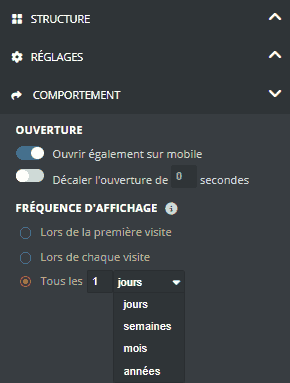
5. To set how the pop-up is displayed, open the form with **Edit**. In the **Form** step, in the right-hand panel, open **COMPORTEMENT**:
- **Ouvrir également sur mobile**: also display the pop-up on phones;
- **Décaler l'ouverture de** … **secondes**: delay the pop-up's appearance;
- **FRÉQUENCE D'AFFICHAGE**: **Lors de la première visite**, **Lors de chaque visite**, or **Tous les** … days, weeks, months or years.
6. When publishing, in the **Your form is ready! What's next?** window, click **Integrate**, then copy the script with **Copy to your clipboard**. If the pop-up is already published, open it with **Edit** and get the script again.
7. Insert this script on the page or pages of your website where the pop-up should appear.
**Important** The pop-up opens automatically on the page. You can delay its opening (step 5), but not trigger it with a click on a button on your website.
## Expected result
The form appears on your website, in the page or as a pop-up, and each answer is saved in the list linked to the form.
## Troubleshooting
### My developer cannot find the "form.js" file
There is nothing to download: the file is hosted by Sarbacane and loaded by the **Step 1** script. Just insert this script as it is.
### The pop-up no longer appears when I reload the page
This is the **FRÉQUENCE D'AFFICHAGE** setting: with **Lors de la première visite**, the pop-up is only displayed once per visitor. To test it or display it more often, choose **Lors de chaque visite** or **Tous les** …, then publish your changes.
### The form appears on my website, but the answers do not reach my list
Check, in this order:
1. The **Step 1** script is present on the page, in addition to the **Step 2** code.
2. The page header contains the encoding ``.
3. The code was copied in full, without changes.
If the problem persists, contact technical support and give the page address.
## Related articles
- [How do I create and publish a form in Sarbacane Forms?](https://help.sarbacane.com/en/articles/183.md)
- [How do I view and export the answers to a Sarbacane Forms form?](https://help.sarbacane.com/en/articles/461.md)