Sarbacane Chat is the conversational marketing application that enables you to stay in contact with visitors to a website or other points of interaction such as social networks.
Sarbacane Chat is one of the applications in the Sarbacane Suite.
You can test Sarbacane Chat during your 30-day free trial and install your customized chat bubble on your website.
It is also possible to use the Sarbacane Chat application independently of the other applications in the Sarbacane Suite.
The main menu located on the left of the Sarbacane Chat home page is divided into 7 sections:
Inbox
Contacts
Conversation scenarios
Knowledge base
Statistics
Automated communication
Settings
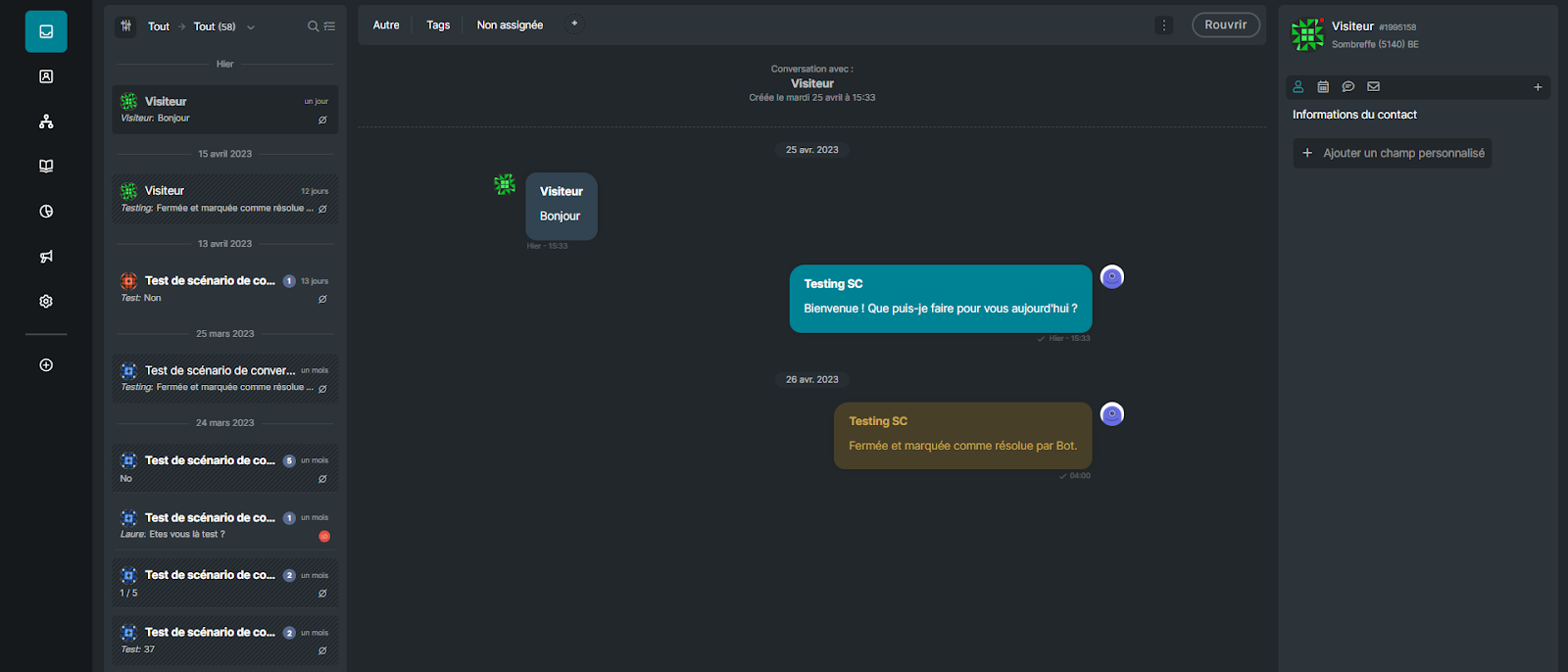
The home screen of Sarbacane Chat is its inbox. This centralizes the conversations between your target audience and your company’s agents, whether they are live or handled by your chatbot.
The inbox is multichannel and multilingual; conversations are displayed in chronological order and can be managed according to filters and statuses (Open / On hold / Closed / All).
From this screen, you can view and/or respond to the conversations displayed.
The “Contacts” section allows you to access the information of the contacts generated from your conversations. You will be able to customize the display, manage metadata, or export your contacts. The “Contacts” section also makes it possible to see which contacts are present in real time on your website.
You will then be able to start a conversation with them depending on the pages on which they are located by sending a predefined reply or by starting a conversation scenario.
This section enables you to control how you manage your conversations: filter your customers’ questions, automatically direct them to a FAQ article, send them forms… The possibilities are endless.
A conversation scenario is a series of preprogrammed replies designed to create a natural exchange between you and your customers. According to your needs, you can use conversation scenarios to automate the way your chatbot handles conversations with your contacts, to segment their needs, and to involve the ideal agent or department depending on the issue raised.
Choose which scenario to start according to the triggers offered in the application and optimize your conversations.

The Sarbacane Chat knowledge base is the FAQ section of your website. You can create and publish articles intended to help your visitors better understand the various topics related to your company.
Your knowledge base enables prospects and customers to find answers freely and independently. The purpose of this knowledge base is to bring together all of your company’s knowledge and information in a single place and to make this information available to your customers.
Your knowledge base is hosted and therefore accessible online under the domain of your choice; it is also available in conversational mode to feed content to your chatbot so that it can respond autonomously to your visitors’ requests.
The Sarbacane Chat application has its own statistics. There you will find all the necessary statistics such as customer satisfaction, agents’ responsiveness and activity, as well as the relevance of the answers provided by your chatbot.
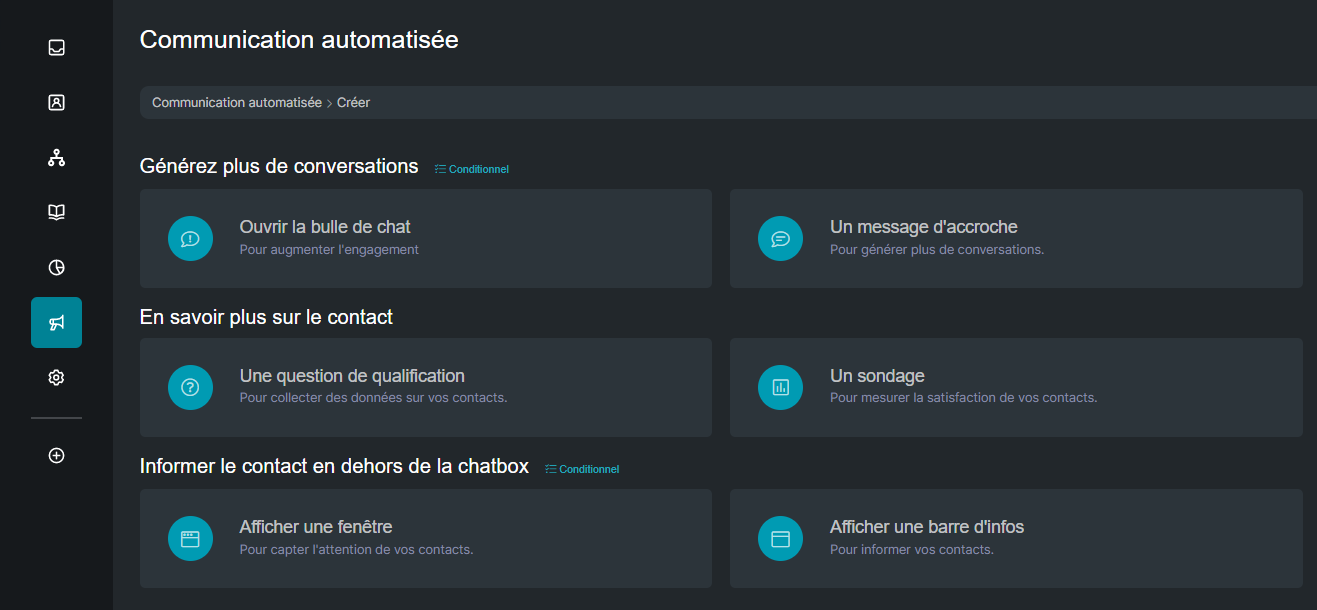
Sarbacane Chat’s automated communications allow you to view or create messages to be sent to a specific group of prospects or customers, at any time, and on any page of your site.
Sarbacane Chat offers several types of automated communications, to generate more conversations, to learn more about your visitors, or to inform the visitor outside your chat bubble. You will be able to add conditions to trigger the sending of these messages from a specific URL, after a certain amount of time spent on a page, according to the language of your visitors, or their journey.
This section will give you the ability to manage the appearance of your chat bubble, to customize the colors, the image used to illustrate the chat bubble, as well as its positioning.
In this section you will find the additional settings for your conversations, customization of your home screen, as well as the interface for managing the deployment of your chat bubble on your site or your social networks.
The assignment rules have been designed to allow your team’s administrators to:
Create conversation topics in order to reduce the time needed to connect your contacts with your team.
Configure the various calendars (brand leave calendar, team members’ calendars, etc.) in order to automatically adjust the behaviour of your chat.
Consequently, your contacts can choose the topic they wish to discuss before the conversation begins. You can define which members of your team are notified when you receive a new conversation request; you can also assign the same member to several topics, and manage the different availabilities.
Finally, these topics are also useful for segmenting your statistics according to the different topics of your company.
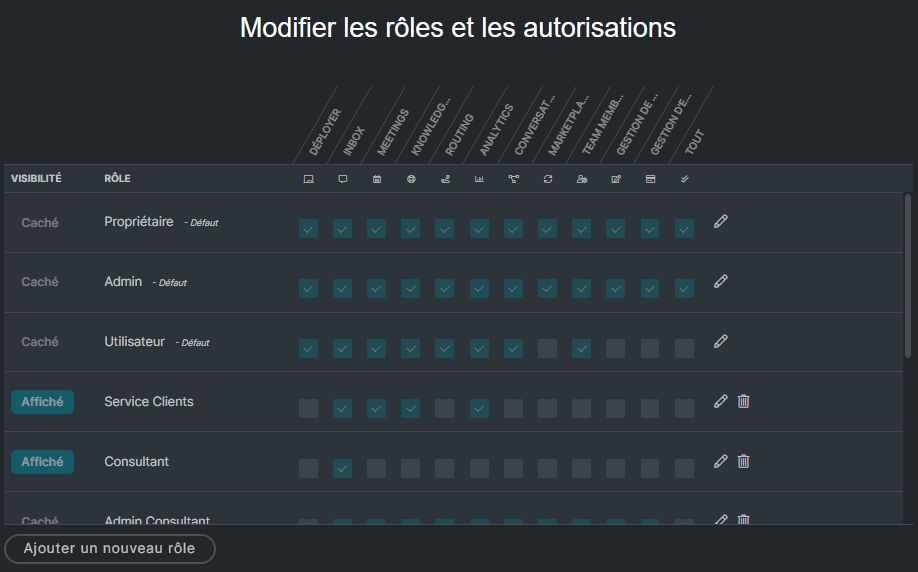
This section allows you to configure Roles and Permissions for each of your teammates. In other words, you can decide who is allowed to do what.
Sarbacane Chat provides 3 default roles:
Owner
Administrator
User
In addition to these 3 roles, you can create any roles you wish. The default roles have the default label and can neither be modified nor deleted.
If one of your custom roles has all permissions, it will automatically be considered an administrator and will have the Admin label on the Users page of your Sarbacane Chat account.