When you are in the Email Builder, you have the option to "configure a link".
It is important that your links are not directly visible in the body of your message: this is a spammer technique that could reduce your deliverability and the rendering is not optimal for the reader. This is referred to as "plain text links" in terms of their visibility.
It is therefore recommended to use the "hyperlink" function or "call to action" buttons.
Indicate in the body of your message the word or words of your choice and click on the "configure a link" option:
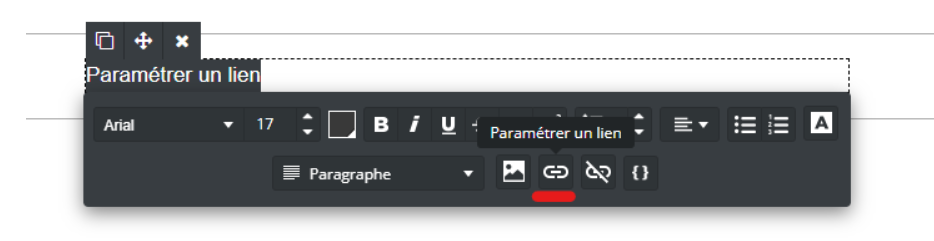
By default, the "to a web page" type is selected; you simply need to enter your website URL. Confirm your action:
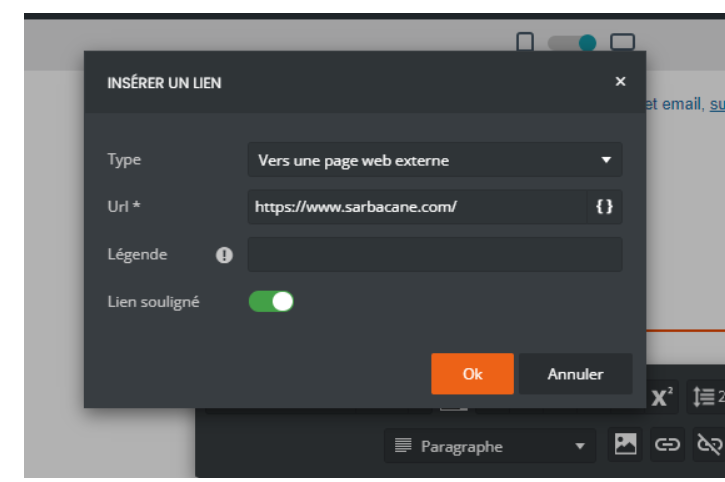
You can add a caption that will be visible when hovering over your link in certain email clients and choose whether the rendering should be underlined or not.
Your link is now configured.
When you select this option, several types of links are available to you:
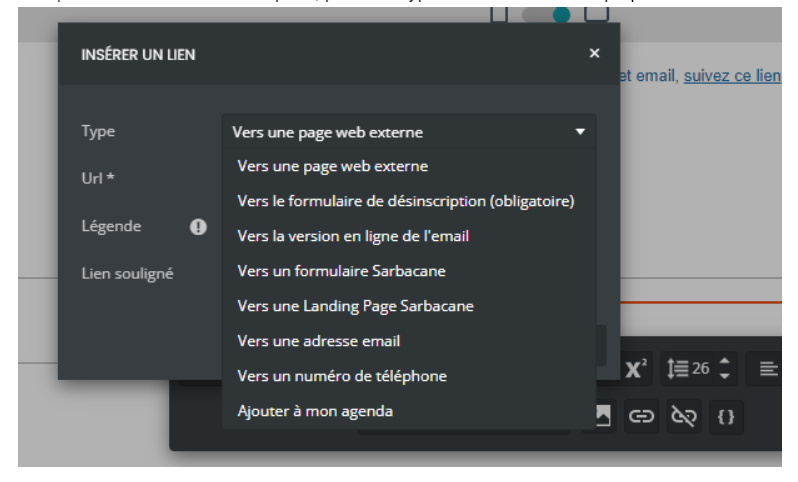
Explanation of the available links:
To an external web page : configure the link to a website URL. Example "Visit our website"
To the unsubscribe form : configure the unsubscribe link. In compliance with GDPR-related regulations, this link is mandatory in your communications to give your recipients the choice to receive or not receive your communications
To the online version of the email : configure the web copy link (the link typically found at the top of emails)

To a Sarbacane Form : choose to direct your recipients to a published form
To a Sarbacane Landing Page : choose to direct your recipients to a published page
To an Email Address : redirect to a mailto link, which allows your contacts to directly open a new window to send you an email.
To a Phone Number : configure a redirect directly to a phone number so your recipients can call you instantly.
Add to My Calendar : configure a redirect to create an event in your recipients' calendar
Note: There is no limitation in terms of the number of links per se; however, it is preferable not to overwhelm your recipients with too many redirects and to limit them. Additionally, a large number of links can extend your campaign and increase its weight, thereby increasing the cost of sending the campaign.
