When you are in the Email Builder, you have the option to “configure a link”.
It is important that your links are not directly visible in the body of your message: this is a spammer technique and the rendering is not optimal for the reader.
It is therefore recommended to use the “hyperlinks” function.
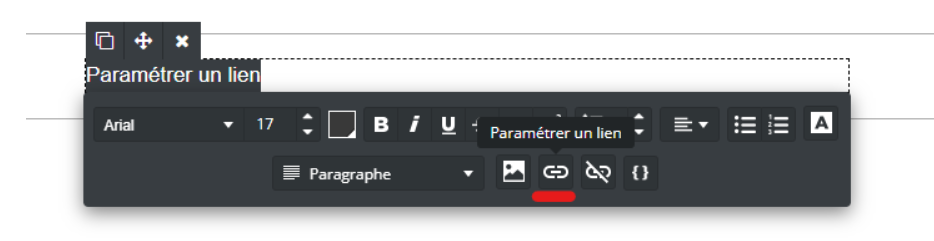
Indicate in the body of your message the word or words of your choice and click on the “configure a link” option:
By default, the type “to a web page” is selected; you simply need to enter the URL of your site. Confirm your action:
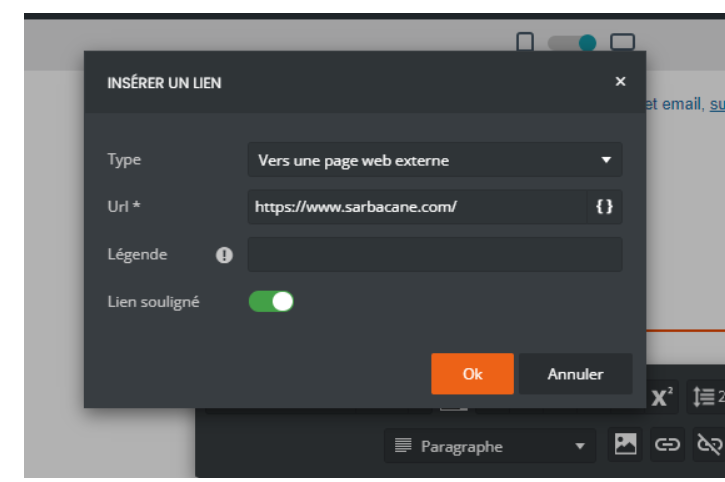
You can add a caption that will be visible when hovering over your link in certain email clients and choose whether the rendering is underlined or not.
Your link is now configured.
When you choose this option, several types of links are offered to you:
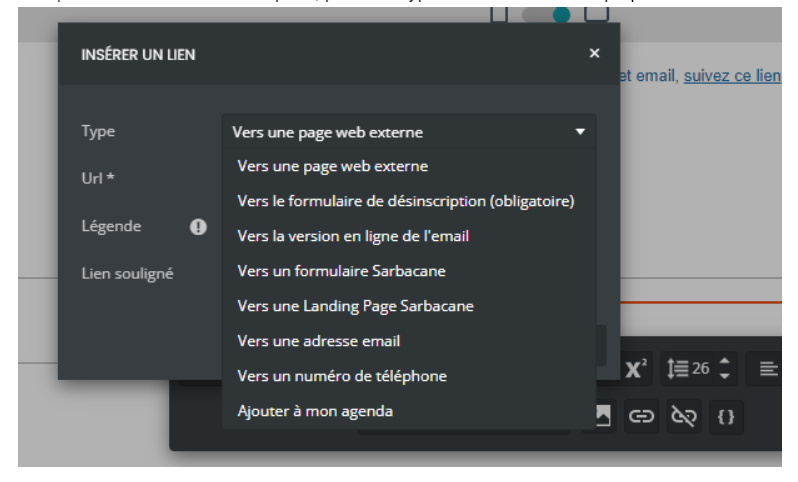
Explanation of the proposed links:
To an external web page : configure the link to a website URL. Example “Visit our website”
To the unsubscribe form : configure the unsubscribe link. In accordance with GDPR-related laws, this link is mandatory in your communications to give your recipients the choice to receive or not receive your communications
To the online version of the email : configure the web copy link (the link generally at the top of emails)

To a Sarbacane form : choose to direct your recipients to a published form
To a Sarbacane Landing Page : choose to direct your recipients to a published page
To an email address : redirect to a mailto, that is, a link that allows your contacts to directly open a new window to write you an email.
To a phone number : configure a redirect directly to a number so that your recipients can call you instantly.
Add to my calendar : configure a redirect to the creation of an event in your recipients’ calendars
