Once your texts have been entered or generated according to the method described in the previous section, you can:
Rephrase text
Summarize text
Translate text.
More details below.
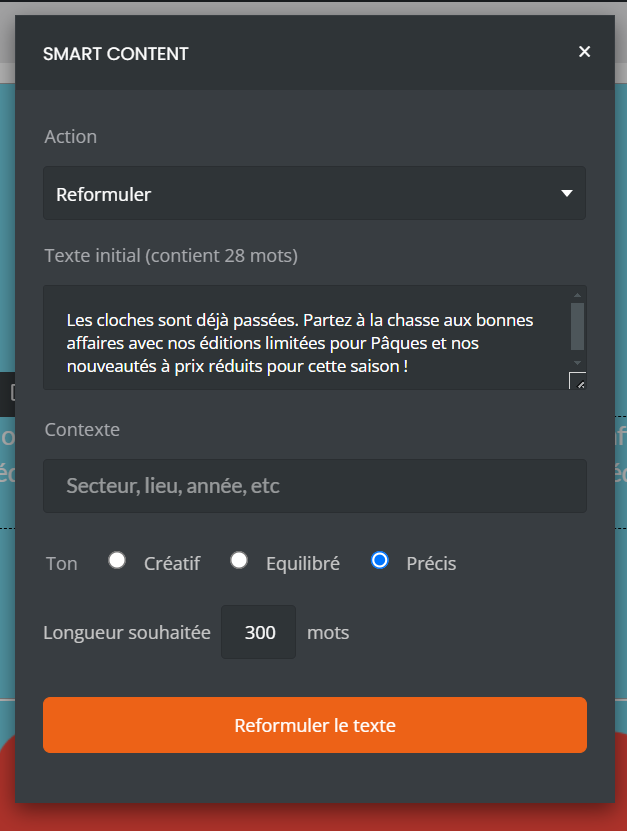
This option is useful if the first version of the text available to you may not completely meet your expectations.
Once the option has been selected, several areas are available:
A reminder of the relevant text, for verification.
“Context”, if the existing text does not seem specific enough to you.
“Tone” allows you to adjust the writing style if the original text does not appear suitable for your audience or your editorial guidelines.
“Desired length” if the relevant text seems too long or too short to you.
If the text you have entered yourself or generated via Smart Content seems too complex or too long, select this option to simplify it. Before launching the summary, it is possible to reread the original text.
It is also possible, in addition, to adjust the tone of your message according to the desired level of originality.
This option displays the excerpt ready to be translated, and additionally detects the source language after a few seconds.
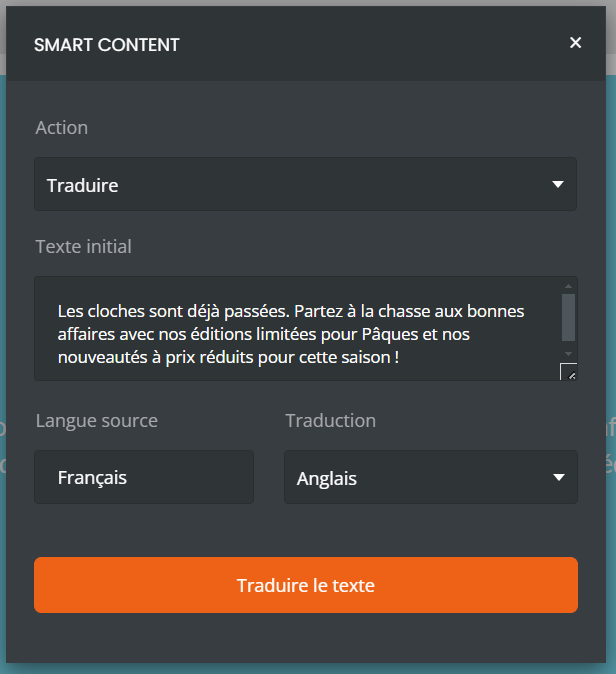
All that remains is to select the desired language via the drop-down menu and confirm using the orange block.
Good to know: it is possible to translate text that has already been previously translated, but it is important to keep in mind that the more a translation is reused, the more likely it is to lose its relevance in context.
