The Text Message option, among the creation modes available in Sarbacane Campaigns, allows you to send emails in plain text format, without images or elaborate formatting.
When you choose a plain text email, here is how it works:
Simple text editor: You have a basic text editor in which you can write the content of your message. There are no complex formatting tools, which means the focus is on plain text.
No images or formatting: Unlike other creation modes, plain text emails do not include any images, styled buttons, or sophisticated layouts. Your message consists only of text.
Personalized fields: You can, however, insert dynamic fields to personalize your message, such as the recipient’s last name, first name, or other specific information.
Simplicity and clarity: The main objective of plain text emails is to deliver a simple and direct message. They are often used for internal communications, informational newsletters, or highly targeted messages.
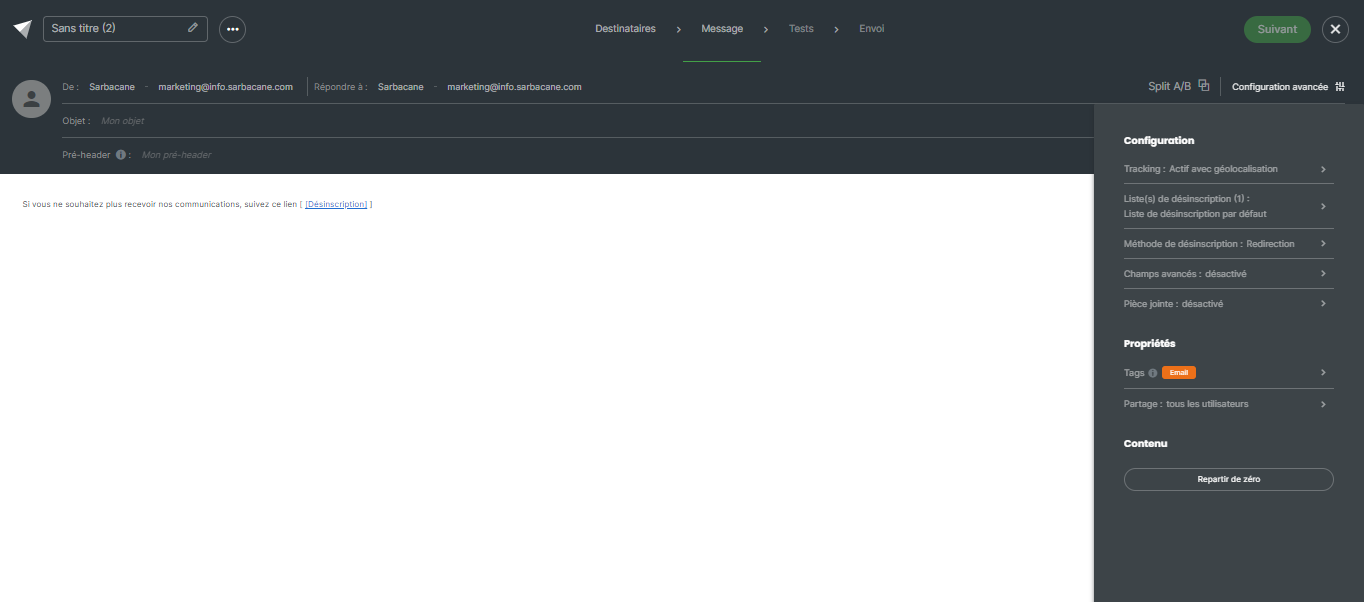
Although plain text emails are simple by nature, you still have several advanced options to further customize them:
Configuration:
Tracking: Enable / Disable tracking options
Unsubscription list: Define one or more unsubscription list(s) for your email campaign, offering your recipients the possibility to unsubscribe if necessary.
Unsubscription method: Define here what should happen when a contact clicks on the unsubscribe link in your campaign:
Be redirected to a standard Sarbacane page confirming the unsubscription
Be redirected to a customised unsubscription form
Be redirected to a page on your website if you manage unsubscribes through an external page outside Sarbacane
Advanced fields: Enable / Disable the display of advanced fields such as carbon copy in the fields available in the header of your campaign
Add an attachment to your campaign
Properties:
Add tags to your campaign: this option allows you to classify your campaigns by channel or topic and to filter statistics by tag.
Sharing: this option allows you to define which users and user groups can have access to your campaign
Start from scratch: If you wish to start your creation again from scratch, use this option to reset your work in progress.
