An A/B test makes it possible to assess the performance of an email campaign by sending two versions of an email to two representative samples of a recipient list. After comparing the statistics, the better-performing version of the two is sent to the remaining contacts. The A/B test provides the opportunity to compare various elements: the subject line, the sender field, or the entire content of the message.
To create an A/B test email campaign, simply create an email campaign in Sarbacane Campaigns, then at the “Message” editing step, click on the “Split AB” section at the top right of the editor.
You can then choose the elements you wish to test:
The sender: allows you to compare two sender names and two sender addresses
The subject line: test two different subject lines and find out which one is the most convincing for your contact list
The content: compare the performance of two entirely different emailings.
You have the option to simultaneously test sender fields, subject lines, and the entire content of your message.
You will be able to compare both versions of each element of your email campaign at the same time via a tab system.
Once you have imported your recipient database, you can proceed to the configuration stage of your A/B test.
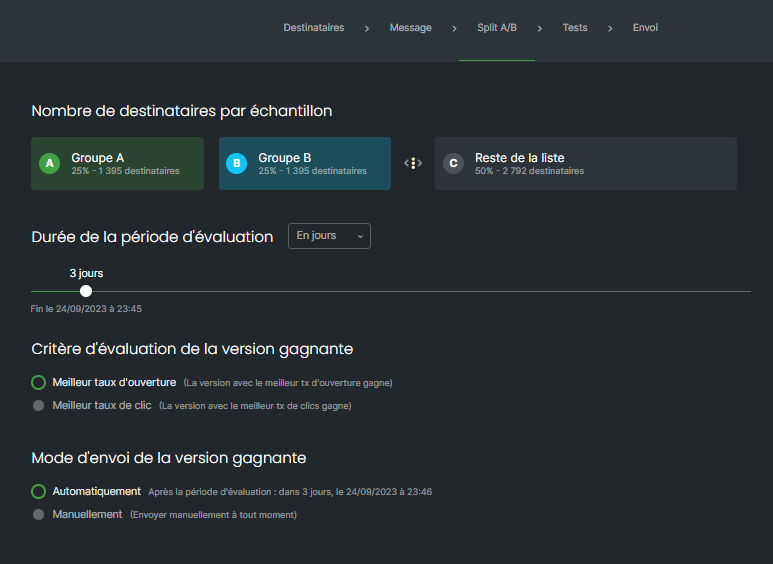
Here you can choose the proportion of your recipient database that will be used as a representative sample of your contacts, and therefore the size of the two groups of contacts that will independently receive the two versions of your message. The recipients who receive the tests will be selected at random.
For the sake of representativeness, it is recommended to have at least 100 people per test group in order to avoid skewing the test.
To modify the proportion of contacts included in the samples, move the slider to the left or to the right to increase or decrease this percentage.
Tick here the condition that will determine which version of your campaign will be defined as the winner at the end of the test:
Best open rate: the message with the highest open rate will be considered the winner of the test
Best click rate: the message that has obtained the highest number of clicks will be considered the winner
If you have chosen Best open rate or Best click rate, you must select the duration of the test using the selector. It is possible to define a number of hours or days after which the test will be automatically stopped and the statistics analysed by Sarbacane in order to immediately send the winning message to your entire database.
You can choose between two sending modes for your A/B test campaigns:
Automatically: Sarbacane Campaigns will send your two versions, analyse the results, and send the winning version to the rest of your list.
Manually: you choose the winner of the test yourself based on the behavioural statistics that will be presented to you over time and choose the moment when the A/B test must stop
During an A/B Test, you obtain two different campaign summaries. You can switch from one to the other by clicking on Message A and Message B in order to obtain details on one or the other of these versions.
Likewise, you can also perform separate test sendings in order to verify the correct layout of each of your messages.
By clicking on Finalize the campaign, you therefore launch your A/B Test on the contact samples that you previously defined.
If you have chosen an automatic decision (best open rate or best click rate), you no longer have anything to do; Sarbacane Campaigns will take care of sending your two versions, analyzing the results, and sending the final campaign.
If you have chosen manual triggering, you will be able to consult the performance of your two versions at any time from the Sarbacane Campaigns home screen or from the Campaigns menu, by clicking on the statistics icon next to the name of your A/B Test campaign. You will then be able to trigger the sending manually whenever you wish.
