Connecting noCRM to Sarbacane allows you to manually or automatically send leads to your Sarbacane contact lists, in order to nurture your prospects, launch campaigns, and perform targeted follow-ups.
This integration (available for the Dream Team, Solopreneur & Call Master editions) connects to Sarbacane Contacts. Once configured, your synchronized contacts can be used in other Sarbacane modules such as Newsletters, Forms, Engage, etc.
Retrieve your API key and your account ID from Sarbacane Contacts: log in to your Sarbacane Contacts account, go to your API profile, then create a new API key.
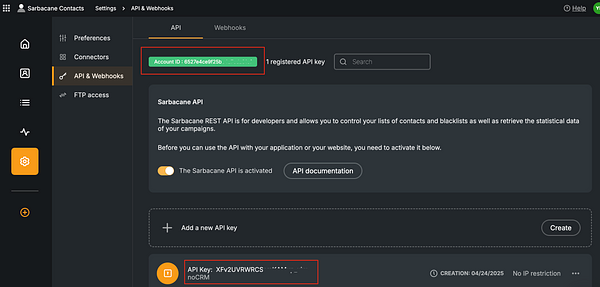
2. In the noCRM interface, go to Administration Panel > Integrations > Third-party applications > then select the Sarbacane integration.
3. Paste your API key and your account ID into the corresponding fields in your noCRM account, then click on Connect.
Once the integration is connected, you can define how noCRM opportunity data is mapped to the fields in your contact lists in Sarbacane. Each list in Sarbacane can have its own set of fields, so make sure to configure them accordingly.
In the Integration Settings, select the Sarbacane contact list you wish to configure.
Match the lead fields in noCRM (e.g.: name, email, phone, tags) with the equivalent fields in your Sarbacane list.
You can ignore unlinked fields if you do not wish to send this information.
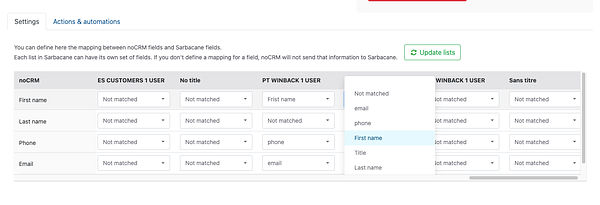
If no field is defined for a piece of data, noCRM will ignore this information when sending the contact to Sarbacane. This ensures that only relevant and properly formatted data is transferred to your marketing campaigns.
Creating a rule allows you to select which event related to an opportunity in noCRM will trigger one or more automated actions in Sarbacane. You can also add conditions that serve as filters and, if the opportunity does not meet the criteria, the automation is stopped.
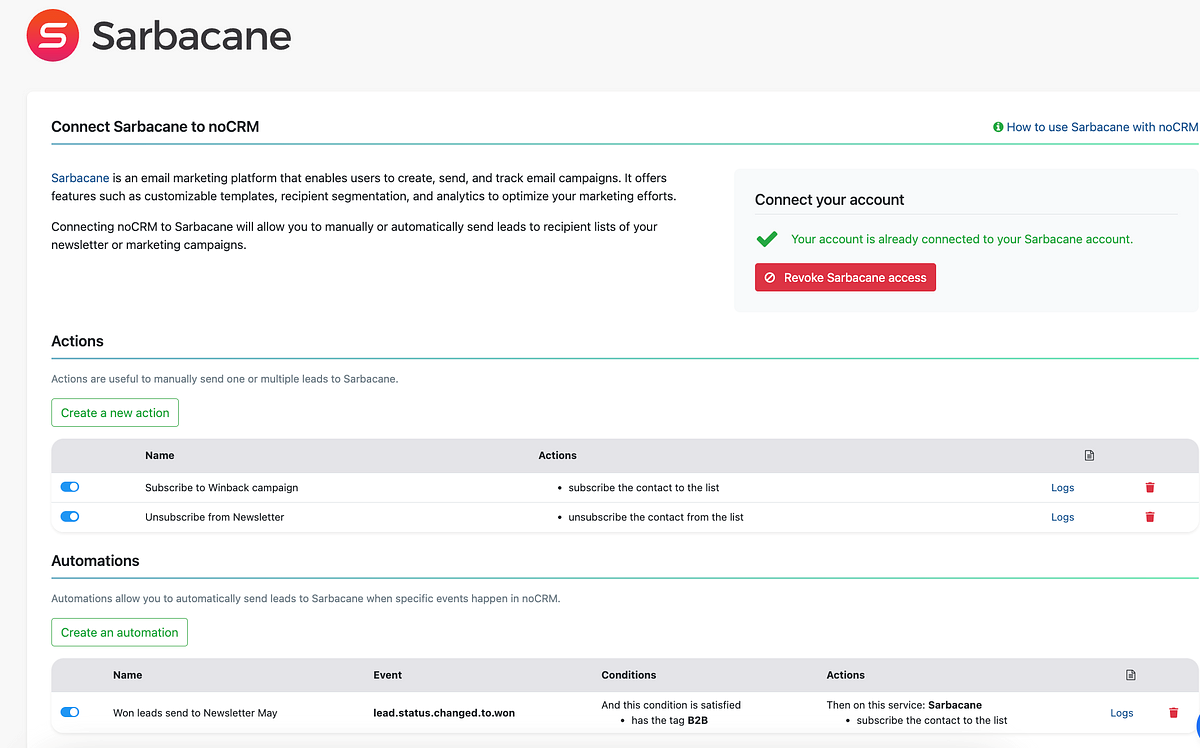
Events supported in noCRM.io:
lead.any_update
lead.assigned
lead.commented
lead.content_has_changed
lead.creation
lead.deleted
lead.email.received
lead.status.changed.to
lead.step.changed.to
lead.unassigned
lead.manual.trigger
Conditions supported in noCRM:
Has the tag
Has the status
Is the owner
Is in the pipeline
Actions supported in Sarbacane:
Subscribe the contact to a list
Unsubscribe the contact from a list
Note: If an opportunity does not contain an email address in noCRM, it cannot be sent to Sarbacane.
