The Sarbacane module for PrestaShop automatically sends your subscribers and customers to Sarbacane Contacts. You install the module in PrestaShop, copy the activation key it generates, then add your store in Sarbacane Contacts. Once connected, the store is also used by the Abandoned cart scenario in Sarbacane Campaigns.
Two lists are retrieved:
PRESTASHOP # Newsletter: your newsletter subscribers (email, mobile, last name, first name);
PRESTASHOP # Users: customers who have an account on your store, with the opt-in and order data (dates of the first and last order, highest, lowest, average and total order amounts, number of orders).
Administrator access to your PrestaShop back office.
Sarbacane Contacts, included with Sarbacane Campaigns.
Your store online.
Download the Sarbacane module for PrestaShop (ZIP file).
In the PrestaShop back office, go to Modules › Module Manager, click Upload a module, then drop the ZIP file.
Once the module is enabled, copy the activation key it displays.
In the left menu of Sarbacane Contacts, click Settings, then Connectors.
Click the PrestaShop card.
Click Add a shop.
Fill in Shop name, URL of your Prestashop website and Activation key (the key copied in step 3), then confirm.
In Contact lists, click Create a list, choose PrestaShop, then your store.
A list “pending synchronization” appears first. After 30 minutes to an hour, it is replaced by your two lists, among the Synchronized lists, with the type Prestashop list. After that, Sarbacane retrieves new information from your store every half hour.
Important: synchronization goes from PrestaShop to Sarbacane, never the other way. A change made in Sarbacane does not go back to PrestaShop.
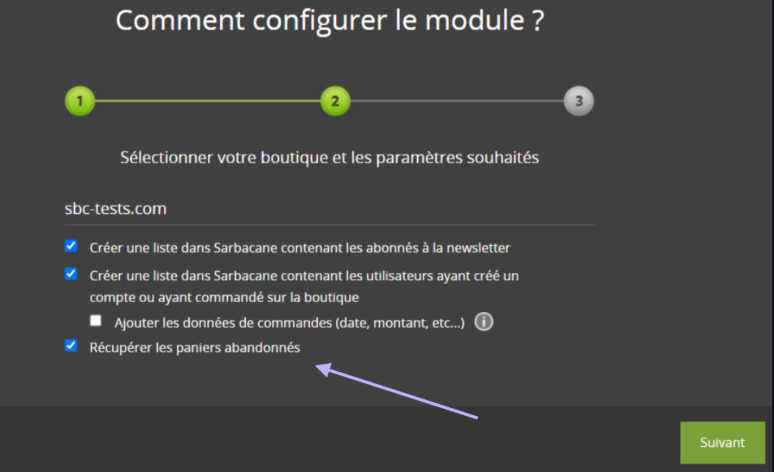
Note: to follow up on abandoned carts, also tick the abandoned cart option in the Sarbacane module of your store.
The first synchronization takes 30 minutes to an hour. If nothing changes after that, check the points in the next symptom.
Check in this order: your store is online; the Sarbacane module is still installed and enabled in PrestaShop; the key has not been regenerated in the module (if it has, paste it again in Activation key); nothing prevents Sarbacane from reaching the module on your site (automatic redirection to a language version, firewall, URL rewriting). Check this last point with the person who manages your store's hosting.
Mailify is Sarbacane's former name. You can continue the installation with this module.
The module does not send tracking pixel consent. Manage it directly in Sarbacane (how to view and modify tracking pixel consent).
This is how synchronized lists work: synchronization adds and updates contacts, but never deletes anything.
