
To ensure that your personalized emails are perfectly configured and correctly display the data for each recipient, it is essential to test them before sending them to your list. Here is how to proceed.
The test email address must be included in the contact list associated with your email campaign: Before you can test personalization, make sure that the email address that will be used for the test (yours or your colleagues’) is included in the contact list you have associated with your campaign. This step ensures that you will be able to view the various forms of personalization in your test emails.
The fields used for personalization must be filled in: Personalization fields, such as first name, must be correctly filled in within the contact list for the email address to which you wish to send a test. If these fields are not filled in for your own email address, personalization will not be visible in the test emails and will result in a blank space.
Access the Tests step of your campaign: This is where you can test your campaign before sending it to your entire list.
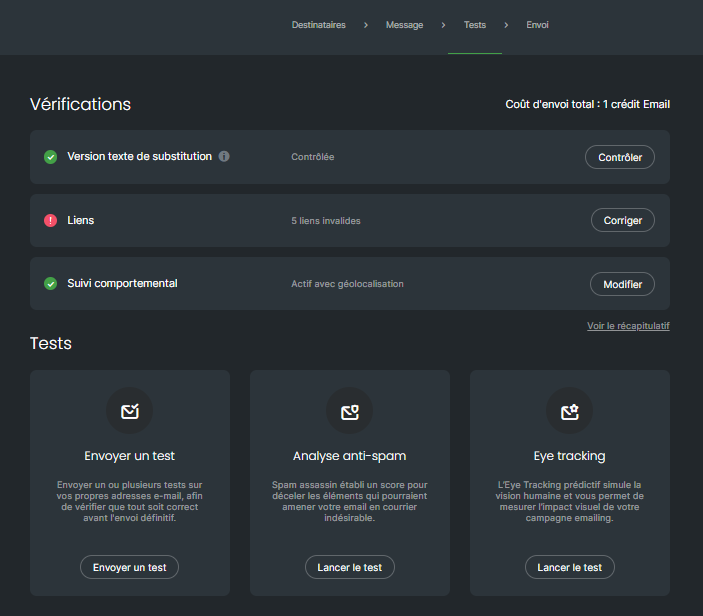
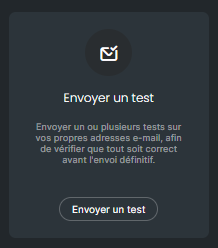
To send a test to an email address:Click on the “Send a test” section
A window opens. Then click on “Edit” to add the email address of your choice or to select the addresses you may already have used previously for sending tests.
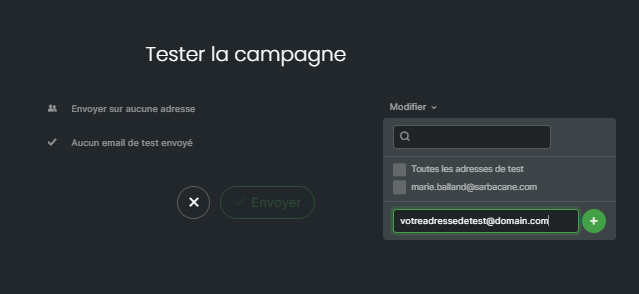
Once the test email addresses have been selected, click on the “Send” button
Check the personalization: When you receive the test email, verify that the personalization fields work as intended. Make sure that your first name or other personalized information is displayed correctly.
Perform additional tests if necessary: If you identify personalization or display issues, return to the campaign creation tab to make the necessary adjustments. Repeat the testing process until everything meets your expectations.
Confirm and send the campaign: Once you are satisfied with the tests and personalization is working correctly, you can proceed with the final sending of your campaign to your list of recipients.
Testing your personalized emails is a crucial step to ensure an optimal reception experience for your recipients. By following these simple steps, you can make sure that each recipient will receive a personalized email that is displayed correctly..