To display a Sarbacane Forms form on your website, copy the code provided by Sarbacane and insert it into your pages. For a form in Pages format, open Integrate on my website in the form's ••• menu. For a pop-up, you get the script in the publication window, with Integrate.
The Sarbacane Forms application added to your Sarbacane plan (it is an option).
A published form.
Access to your website's code, or a person who manages it (developer, agency).
Form in Pages format
In the left menu, open My forms. To the right of the form name, click •••, then Integrate on my website. The Form block to embed window opens.
Step 1: check that the header of your pages contains the encoding <meta charset="utf-8">, then insert the script shown on the page or pages concerned.
Step 2: insert the form code where it should appear.
(optional) Step 3: add the CSS to your style sheet to keep the form's appearance.
To copy a code, click the icon at the top right of its block.
Note Only the form block is embedded. The other contents of the page (texts, images around the form) are not part of the code.
Pop-up form
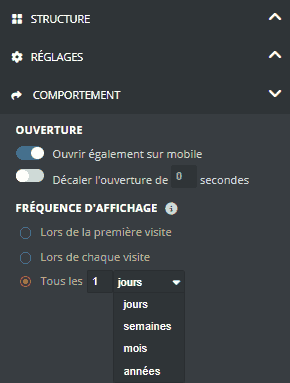
To set how the pop-up is displayed, open the form with Edit. In the Form step, in the right-hand panel, open COMPORTEMENT:
Ouvrir également sur mobile: also display the pop-up on phones;
Décaler l'ouverture de … secondes: delay the pop-up's appearance;
FRÉQUENCE D'AFFICHAGE: Lors de la première visite, Lors de chaque visite, or Tous les … days, weeks, months or years.
When publishing, in the Your form is ready! What's next? window, click Integrate, then copy the script with Copy to your clipboard. If the pop-up is already published, open it with Edit and get the script again.
Insert this script on the page or pages of your website where the pop-up should appear.
Important The pop-up opens automatically on the page. You can delay its opening (step 5), but not trigger it with a click on a button on your website.
The form appears on your website, in the page or as a pop-up, and each answer is saved in the list linked to the form.
There is nothing to download: the file is hosted by Sarbacane and loaded by the Step 1 script. Just insert this script as it is.
This is the FRÉQUENCE D'AFFICHAGE setting: with Lors de la première visite, the pop-up is only displayed once per visitor. To test it or display it more often, choose Lors de chaque visite or Tous les …, then publish your changes.
Check, in this order:
The Step 1 script is present on the page, in addition to the Step 2 code.
The page header contains the encoding <meta charset="utf-8">.
The code was copied in full, without changes.
If the problem persists, contact technical support and give the page address.
