When you create an SMS campaign in Sarbacane Campaigns, the first step is dedicated to importing your contacts into your email campaign.
You can import them in different ways:
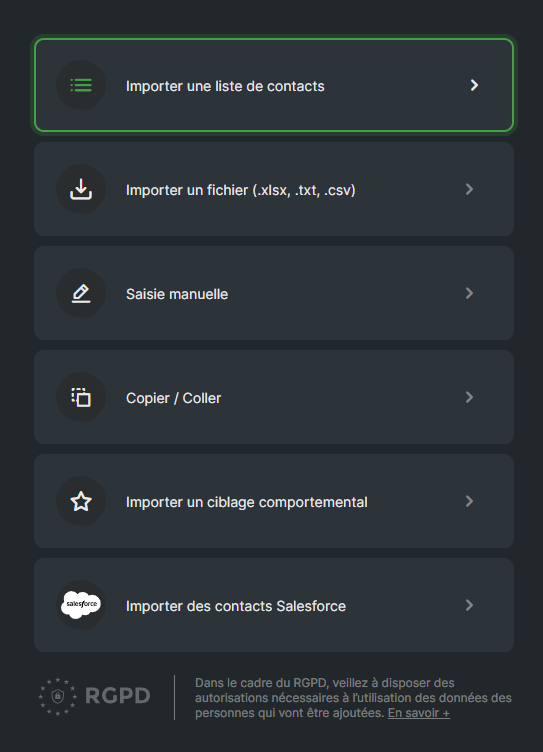
Import a contact list: If you have already created a contact list in the Sarbacane Contacts application, you can easily import it into your SMS campaign with this option. You simply need to select the desired list from the list that appears.
Import a file in xslx, txt or csv format: This method is ideal if you have a contact list stored in an external file. Ensure that the file complies with the correct format (xlsx, txt or csv). Note that, to guarantee optimal processing of your import, we recommend that you prioritize the txt or csv formats.
Enter manually: If you have a small number of recipients or prefer to enter their information manually, you can use this option. You will need to enter details such as phone numbers and names one by one.
Copy / paste a list of addresses: to save time, you can copy a list of addresses from an external source (for example, a text file, an email, or a spreadsheet) and paste it directly into the Sarbacane Campaigns interface. Make sure you use the appropriate separators (, or ; or tabs) so that the system can correctly recognize the data.
Import behavioral targeting: If you have tracked your contacts’ previous actions, such as opens or clicks on specific campaigns, you can use this method to create behavioral targeting. For example, you can choose to send your SMS only to people who opened your previous campaigns. This allows you to further personalize your campaign based on your recipients’ behavior.
Other import methods may be displayed depending on the connectors available on your account (Salesforce or others).
