When sending SMS via Sarbacane, messages are encoded according to the GSM 7-bit standard. This standard defines an alphabet that ensures increased compatibility of messages with mobile phones.
Sarbacane supports two defined categories of characters: simple characters and those requiring an extension (double characters).
Simple characters
The directly supported characters include:
Uppercase and lowercase letters of the Latin alphabet (A to Z, a to z),
Digits (0 to 9),
Some common accented characters (é, è, à, ç, etc.),
And frequently used symbols such as: @, ?, !, &, etc.
Extended (double) characters
Certain less common symbols, although allowed, require special encoding. They use two units of space instead of one, which reduces the maximum length of the message. Among these characters are:
Curly braces: { }
Square brackets: [ ]
The pipe symbol: |
Accented and punctuation characters such as ^, ~, \
And others such as the euro sign (€)
To maximise the available length of your messages, prioritise simple characters. Those requiring an extension reduce the total number of usable characters.
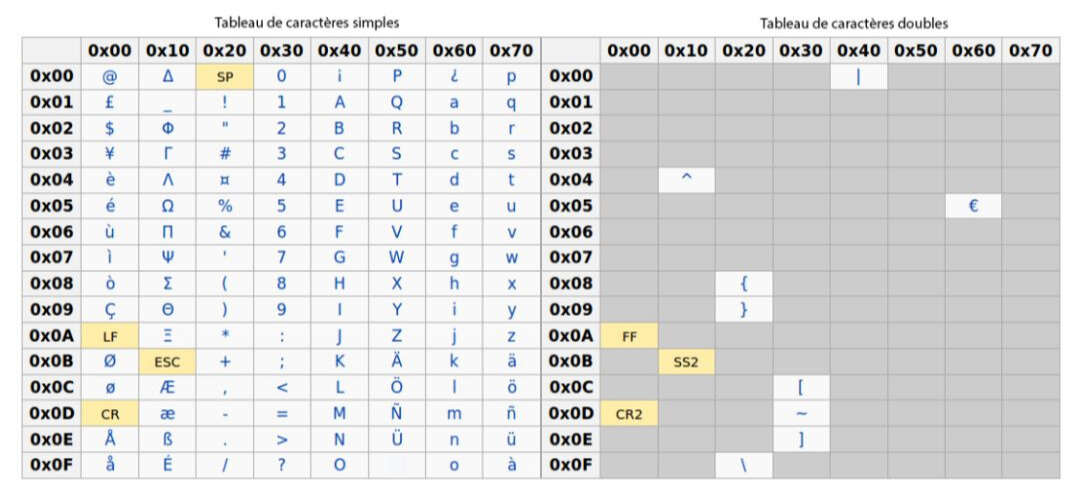
Certain characters are not compatible with this standard. This notably includes:
Emojis (😊, 👍, ❤️, etc.)
Characters from other alphabets such as:
Mandarin (汉字)
Arabic (العربية)
Cyrillic (Кириллица)
Complex accented letters (ê, ï, œ, etc.)
Typographic quotation marks (“ ”), curly apostrophes (‘ ’), etc.
How are these characters handled?
When an unsupported character is detected, Sarbacane attempts to replace it with a visually or phonetically similar equivalent. For example:
ê → e
œ → oe
ï → i
If no suitable equivalent can be found, the character is replaced with a question mark (?). This ensures the readability of the message without causing display errors. For example:
Original text = Thank you for your loyalty 😊
Sent text = Thank you for your loyalty ?
To ensure the best possible compatibility with mobile phones and to avoid your SMS messages being misinterpreted, here are some recommendations:
Use simple characters, without complex accents or rare symbols.
Avoid emojis and characters from non-Latin alphabets.
Perform a preliminary test in order to verify how your messages are displayed before sending them.
