With staggered sending in Sarbacane Campaigns, your email campaign goes out in small batches, at the pace you choose (a number of emails per minute), instead of all at once. This is useful for your first sends with a new domain, or when you expect calls or visits to your website after sending.
A Sarbacane Campaigns subscription (all plans).
An email campaign ready to send (recipients, message and checks completed).
At the top of the screen, click the Send step.
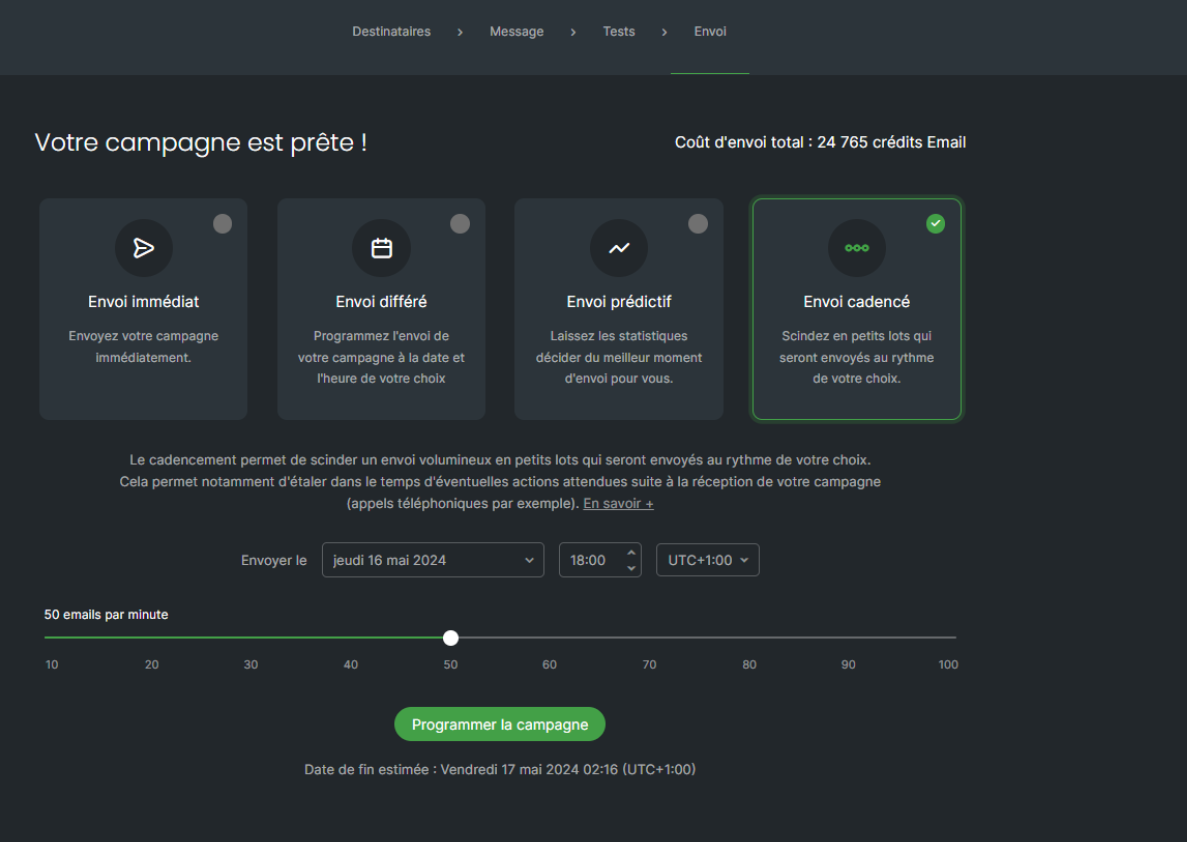
On the page telling you that your campaign is ready, click the staggered sending tile (the fourth one).
Move the slider to choose the number of emails sent per minute.
Below the slider, check the estimated end date of the sending.
Caution: once the sending has started, it can't be stopped or changed. You can only cancel it while there are more than 30 minutes left before it starts.
At the bottom of the page, click the button that schedules the campaign.
Best practice: for your first sends with a recent domain, aim for about 40 emails per minute. There is no fixed rule, but a moderate pace avoids alerting mailbox providers' spam filters.
The campaign goes out in successive batches until the estimated end date. Your statistics fill in as it goes.
This is normal until the estimated end date has passed: batches keep going out at the pace you chose.
