Sarbacane allows you to purchase a domain name that will be dedicated to your sends from the software. The advantage of this option is that your sends will be authenticated and you will be able to be recognized as a trusted sender.
Here are the steps to follow:
Prerequisite: have a domain credit available. If this is not the case, purchase one via the store from your account or contact your account manager.
Go to the “Domains” section in the Sarbacane Campaigns settings. Click on “Add a domain name”, then “New domain” to create your domain name with Sarbacane.
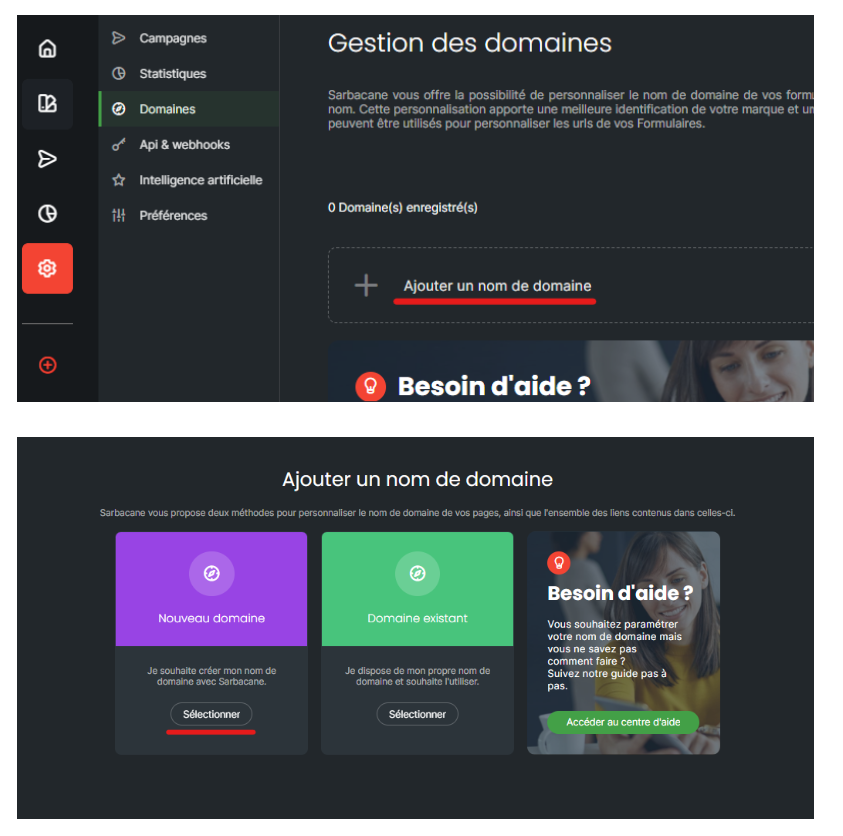
In the Domain name field, enter the domain name of your choice, then click Check to verify its availability.
If the desired domain name is available, you will be able to finalize the reservation by clicking Reserve.
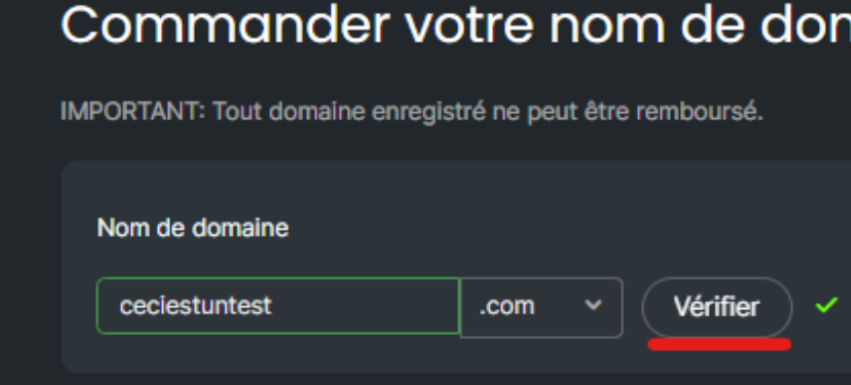
For a domain name to be available, this domain must not already exist and must consist only of lowercase letters, without spaces and without dots (only hyphens are accepted).
Once you have reserved your sending domain, Sarbacane will take care of the validation and the implementation of the necessary DNS records for you, in order to ensure a correct and secure configuration. The configuration of your domain may take a few hours. The status of your domain will be indicated in the “Domains” section of the Sarbacane Campaigns settings.
Warning:
During the first 48 hours following the purchase of your domain, you will only be able to send tests because Spamhaus blocks the use of new domain names for security purposes (identity theft, etc.)
It is recommended to wait approximately one week before actively using a new domain name after its purchase, as the anti-spam filters of email providers may be suspicious of recently created domains. This period allows the domain to acclimate before starting its use, although the need to warm up the domain is not explicitly mentioned.
