To get form templates in your brand's colors, use Smart Templates in Sarbacane Forms. Just enter your website address: artificial intelligence analyzes its visual identity and generates ten ready-to-use templates (event, newsletter, satisfaction, etc.). They are then stored in the Smart Templates folder of your template gallery.
The Sarbacane Forms application added to your Sarbacane plan (it is an option).
Your website address.
Open a form in the Templates step: a new form (on the Sarbacane Forms home page, Create) or an existing form (My forms, •••, Edit).
On the left, click the Smart Templates folder.
At the top right of the gallery, click Generate new templates. A panel opens on the right.
In Website, enter your website address, then click the icon to the right of the field to start the analysis.
Under Style guide, check the detected logo and color. To change the color, click the color swatch or enter another color code (for example #FF5B49). The preview updates.
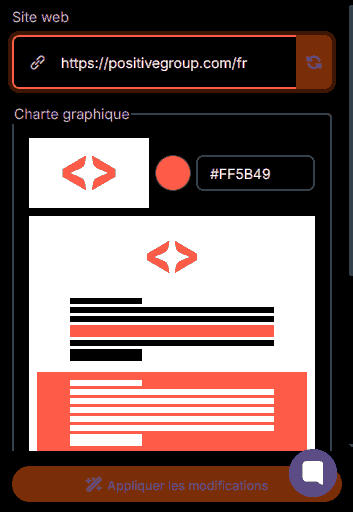
At the bottom of the panel, click Apply changes.
The templates appear in the Smart Templates folder. Hover over a template: click Preview to see it in full size, or Use this template to create your form from it.
The Smart Templates folder contains ten templates in your colors (event, newsletter, satisfaction, etc.). Their names vary from one generation to the next.
The generation service is not responding. Try again a few minutes later. If the message persists, contact technical support.
Click Generate new templates. Under Style guide, enter the correct color code, then click Apply changes.
