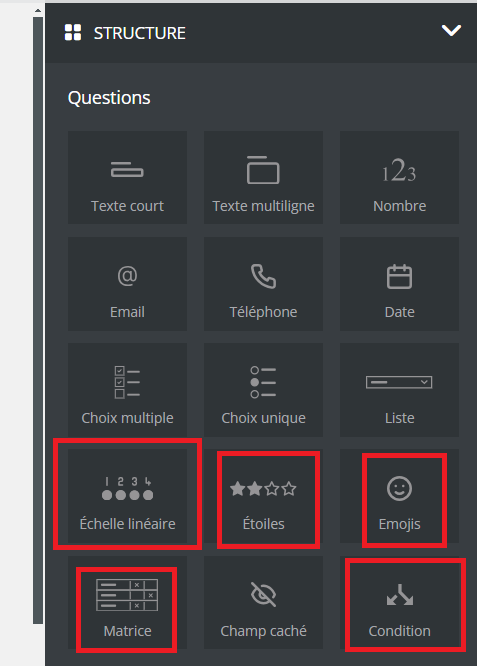
Sarbacane Forms offers sixteen question types, all available in the editor's Questions panel. Standard questions collect a text, a number, a date or a choice. Advanced questions measure satisfaction or a feeling, or display different questions depending on the answer given.
Type | What it is for | Example |
|---|---|---|
Short text | A free answer on one line | Company name |
Multiline text | A longer free answer | "Describe your need" |
Number | A numerical value | Number of participants |
An email address | Contact address | |
Phone | A phone number | Mobile number |
Date | A date | Date of birth |
Multi choice | Several possible answers from a list | Interests |
Single choice | A single answer from a few displayed options | Title (Mr, Ms) |
List | A single answer from a drop-down list, useful when there are many options | Country |
Linear scale | A graded score (maximum score adjustable up to 10) | "From 1 to 10, would you recommend our service?" |
Stars | A star rating | "How many stars would you give the training you attended?" |
Emojis | A feeling, chosen from pictograms | "How do you feel before the event?" |
Matrix | Several short questions with the same answer choices | Strongly disagree … strongly agree |
Hidden field | A value saved with the answer but invisible to the respondent | Source of the visit |
Condition | Content or questions displayed based on the respondent's choice | "Interested? Can we call you?" |
Behavioral tracking preference | The respondent's choice to accept or refuse the tracking of their behavior (opens, clicks) | Consent to email tracking |
The Sarbacane Forms application added to your Sarbacane plan (it is an option).
A form linked to a contact list (Replies step).
In the left menu, open My forms. To the right of the form name, click •••, then Edit.
At the top of the screen, open the Form step.
In the Questions panel on the right, drag and drop the type you want into the form (see the table above).
In the Question properties window, choose in Match in the list the column that will receive the answer. Turn on Required answer if the respondent must answer.
At the top right, click Save. If the form is already online, click Publish my modifications.
The question appears in the form, and each answer is saved in the chosen column of your contact list.
The question is not linked to any column of the list. Hover over it, click the pencil icon, then choose a column in Match in the list.
