When a prospect replies to a Sarbacane Engage sequence, the reply is categorised (positive, negative…). If noCRM is connected, Sarbacane Engage can use it to update the matching opportunity in noCRM: you no longer have to do it by hand.
A Sarbacane Engage licence.
noCRM connected to Sarbacane Engage (see How do I connect noCRM to Sarbacane Engage?).
Prospects present both in noCRM and in your Sarbacane Engage sequences.
In the left menu, click the applications icon (grid), then the noCRM card.
The noCRM settings window shows that you are connected to noCRM. Below, turn on the actions you want:
Move the noCRM opportunity if the Engage prospect replies positively.
Add a link to the reply on the noCRM record if an Engage prospect replies positively.
Change the noCRM opportunity status to 'To do' if the Engage prospect replies positively.
Cancel the noCRM opportunity if an Engage prospect replies negatively.
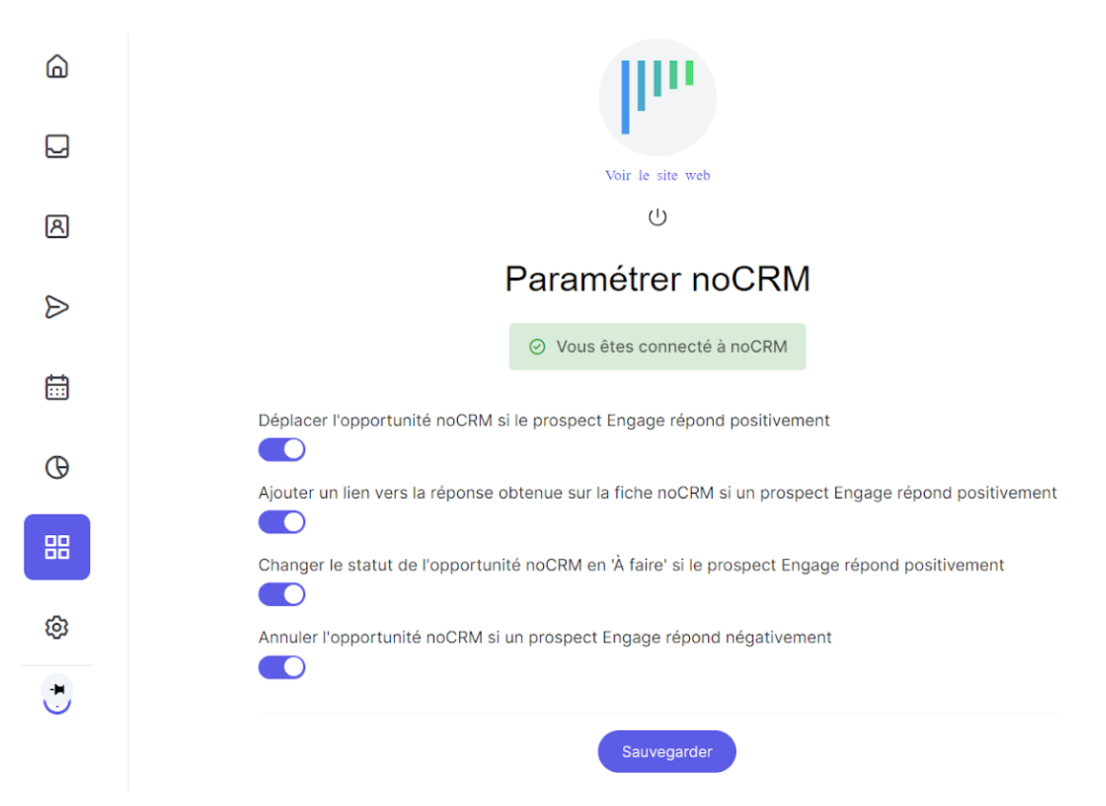
At the bottom, click the button to save.
With each new reply categorised as positive or negative, the prospect's opportunity is updated in noCRM according to the actions turned on.
Check the reply's category in the inbox: only replies categorised as positive or negative trigger an action (an out-of-office or unknown reply, for example, triggers nothing). Also check that the prospect has an opportunity in noCRM.
