In Sarbacane Campaigns, an A/B test sends two versions of an email campaign (A and B) to two randomly selected groups of contacts. After the evaluation period, the version with the best open or click rate goes to the rest of the list, automatically or when you decide. You can vary the sender name, the subject or the whole content.
A Sarbacane Campaigns licence.
An email campaign created with the EmailBuilder, with its recipients. The A/B test does not exist for campaigns created from an HTML file or as text only.
At the Message step, in the top right corner of the header, click Split A/B. A Split A/B step is added to the progress bar, between Message and the checks.
In the window that asks what you want to test, turn on the switches you need: sender name, message subject, message content.
In the header, fill in both versions of each element: the A (green) and B (blue) fields of the sender and subject lines.
If you are testing the content, switch from one version to the other with the Message A and Message B tabs above the email, and edit each one.
In the top right corner, click Next.
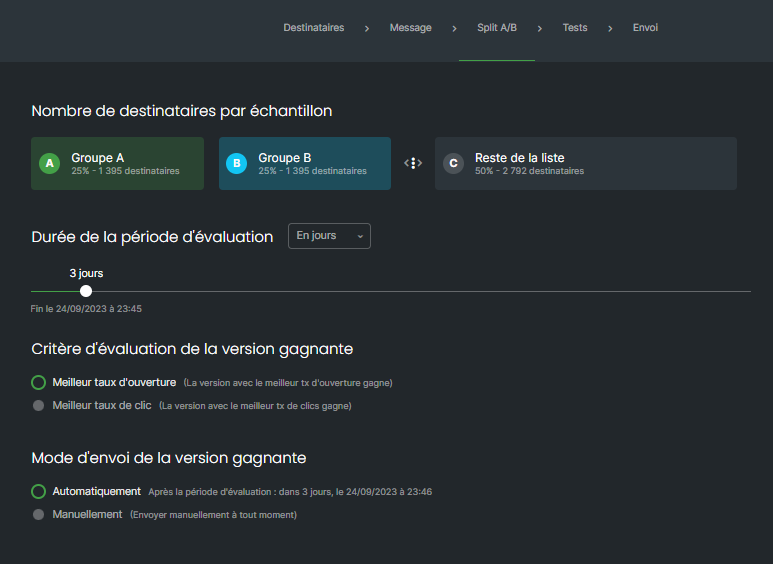
At the Split A/B step, in the number of recipients per sample section, move the slider between group B and the rest of the list to set the size of groups A and B.
In the evaluation period section, choose the unit (days, for example), then set the duration with the slider. The end date is shown below it.
In the winning version criterion section, choose best open rate or best click rate.
In the winning version sending mode section, choose automatically (at the end of the evaluation period) or manually (at any time).
In the top right corner, click Next.
At the checks step, view the summary of each version (Message A, Message B) and send a test of each one.
At the sending step, click the button to finalise the campaign.
Best practice: plan at least 100 contacts per test group so that the result is reliable.
Both versions go to their groups. In the campaign statistics, Results tab, total sending section, a cup shows the winning version.
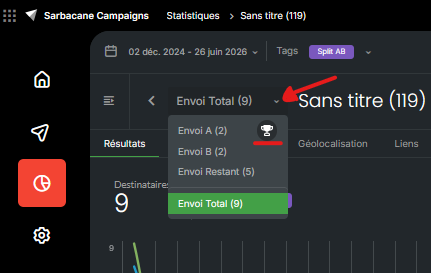
In manual mode, you launch it yourself: in the campaign statistics, Results tab, total sending section. In automatic mode, it is sent at the end of the evaluation period, on the end date shown at the Split A/B step.
The groups are empty: add recipients at the Recipients step, or enlarge groups A and B with the slider.
The A/B test only exists for campaigns created with the EmailBuilder.
