An A/B test allows you to evaluate the performance of an email campaign by sending two versions of an email to two representative samples of a recipient database. After comparing the statistics, the most performing version of the two is sent to the remaining contacts. The A/B test offers the possibility to compare different elements: the subject line, the sender field, or the entire message content.
To create an A/B test email campaign, simply create an email campaign in Sarbacane Campaigns, then at the "Message" editing step, click on the "Split AB" section in the top right of the editor.
You can then choose the elements you wish to test:
The sender: allows you to compare two sender names and two sender addresses.
The subject line: test two different subject lines and discover which one is most convincing to your contact list.
The content: compare the performance of two different emails in all aspects.
You have the ability to test both sender fields, subject lines, and the entire content of your message.
You can compare the two versions of each element of your email campaign simultaneously via a tab system.
Once you have imported your recipient database, you can proceed to the configuration step of your A/B test.
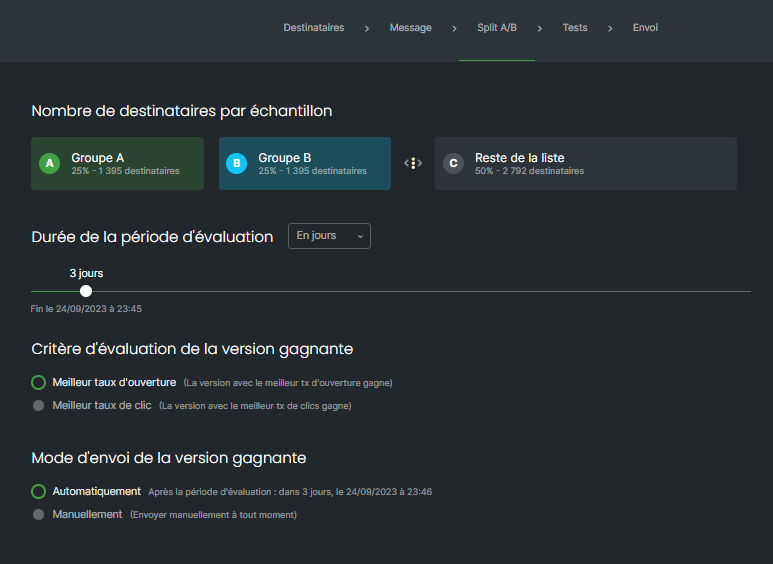
You can select here the proportion of your recipient database that will be used as a representative sample of your contacts, and thus the size of the two groups of contacts that will independently receive the two versions of your message. Recipients who will receive the tests will be selected randomly.
For representativeness purposes, it is recommended to have at least 100 people per test group to avoid biasing the test.
To modify the proportion of contacts in the samples, move the slider to the left or right to increase or decrease this percentage.
Check here the condition that will determine which version of your campaign will be defined as the winner at the end of the test:
Best open rate: the message with the highest open rate will be considered the test winner
Best click rate: the message that received the most clicks will be considered the winner
If you have selected Best open rate or Best click rate, you must choose the test duration using the selector. It is possible to define a number of hours or days after which the test will be automatically cancelled and the statistics analyzed by Sarbacane in order to send the winning message to your entire database immediately thereafter.
You can choose between two sending modes for your A/B test campaigns:
Automatically: Sarbacane Campaigns will send your two versions, analyze the results, and send the winning version to the rest of your list.
Manually: you choose the test winner yourself based on the behavioral statistics that will be presented to you over time and decide when the A/B test should stop
From your campaign statistics, you will be able to verify the winning version thanks to the victory cup that appears in the "results" section then "total send":
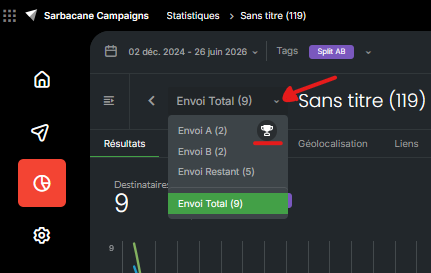
During an A/B test, you obtain two different campaign summaries. You can switch between them by clicking on Message A and Message B to obtain details on one or the other of these versions.
Similarly, you can also perform separate test sends to verify the proper formatting of each of your messages.
By clicking on Finalize Campaign, you launch your A/B Test on the contact samples you defined previously.
If you have chosen an automatic decision (best open rate or best click rate), you have nothing more to do. Sarbacane Campaigns will handle sending your two versions, analyzing the results, and sending the final campaign.
If you have chosen manual triggering, you can view the performance of your two versions at any time from the Sarbacane Campaigns home screen or from the Campaigns menu by clicking on the statistics icon next to your A/B Test campaign name. You can then trigger the send manually whenever you wish.
