When you are a client of both Engage and Corporama, this integration allows you, in just a few clicks, to import contacts from Corporama into Datananas. All you have to do then is add the newly imported contact(s) to the sequence of your choice.
— Go source a prospect.
– An option allowing you to connect to Datananas will be offered to you.
-Once connected, you can follow these steps:
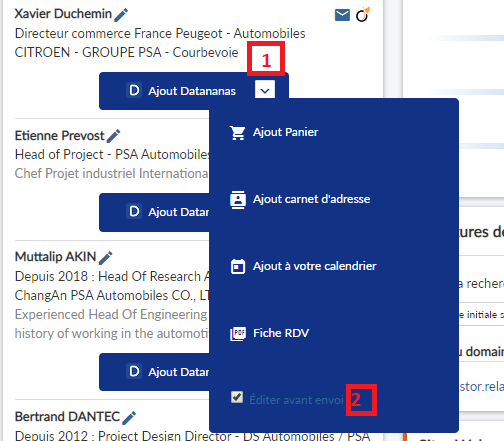
In order to be able to choose between your different lists available on Datananas, you will need to tick the box "Edit before sending" (2) via the drop-down menu button (1):
If you are already a Corporama client, to set up the connector with Datananas, you simply need to contact Corporama customer service by email: [email protected]
or by telephone on 01 71 16 31 16 then press 2.
If you are not a Corporama customer and you are interested in the software, you can contact [email protected] or the sales department at 01 71 16 31 16 then press 1.
