Engage has a native integration with the database provider L'ADN Data (formerly Doc Marketing).
When you are a client of both Datananas and L'ADN Data, this integration allows you, in just a few clicks, to import contacts from L'ADN Data into the desired list on Datananas. You then simply need to add the newly imported contact(s) to the sequence of your choice.
Here is how to connect your Datananas account to the L'ADN Data platform:
Log in to L'ADN Data
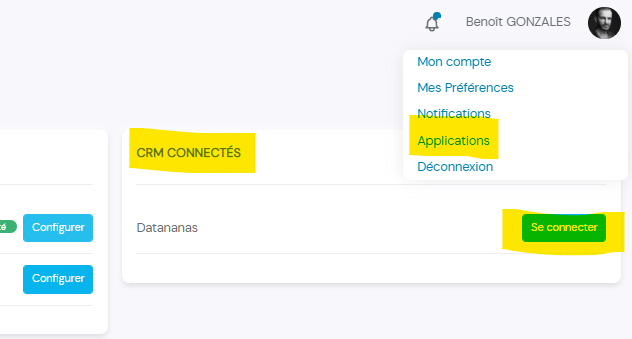
Go to your applications via the link https://app.ladn-data.eu/users/applications
Click on "Log in" next to "Datananas" in the "Connected CRMs" column
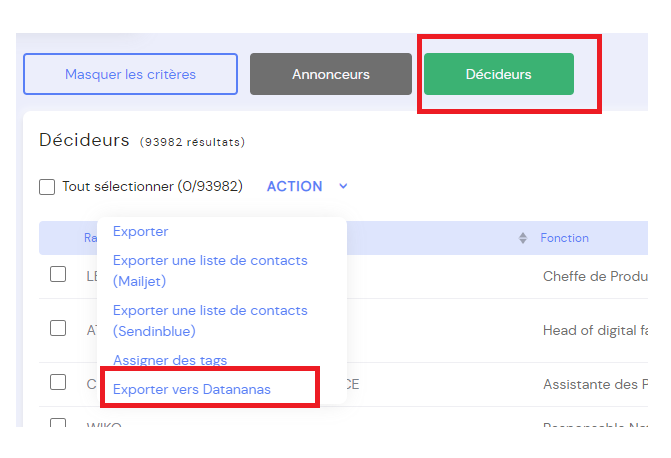
In order to export data to Datananas, you must select Decision Makers and then click on Export to Datananas. The option is not available for users who only want advertiser information.
If you are already a client of L'ADN Data and are experiencing difficulties setting up the connector with Datananas, we invite you to contact L'ADN Data customer service by email at [email protected] or by telephone on 01 44 59 23 00.
If you are not a client of L'ADN Data and are interested in the software, you may send your request to [email protected].
