In Sarbacane, you can view and modify your recipients' behavioral tracking consent (measurement of the opens and clicks of your emails) directly from your contact lists and their individual records. This information helps you comply with CNIL requirements by recording the contact's choice and the date of its last update.
Have access to the directory and contact lists.
Note: the CNIL requires you to obtain recipients' consent before measuring their opens and clicks. Without active consent, neither the contact's opens nor clicks are measured in your statistics; their links work normally.
In your contact lists, two dedicated columns let you view this consent:
"Email behavioral tracking consent": indicates whether the contact has accepted (Active) or refused (Inactive) behavioral tracking.
"Behavioral tracking consent date": indicates the date when this choice was recorded or last modified.
You can show or hide these columns as needed from the column management menu of your list.

Note: if no value has been entered yet for a contact (for example, a contact imported before this feature was introduced), these columns may appear empty. The contact is then considered not to have given consent.
Go to the Contacts application, then:
Open your contact list and click the contact concerned to open their record.
In the side panel, click Edit.
In the Email behavioral tracking consent section, turn the switch on or off to update the contact's choice.
Click Modify.
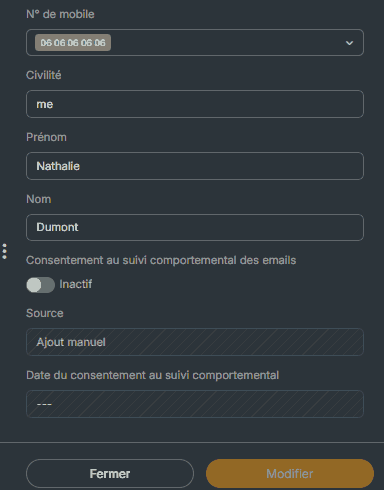
Important: the consent date is automatically updated with today's date each time you make a change. It corresponds to the last update and cannot be entered manually.
The contact record and the "Email behavioral tracking consent" and "Behavioral tracking consent date" columns of the list immediately show the new status and today's date.
Note: behavioral tracking consent can also be entered or updated through other channels: list import, API, the Behavioral tracking preference question of a form, the behavioral tracking opt-out link in your campaigns, or the preferences management page. Whatever its origin, the information is displayed in the same columns and on the contact record.
→ How to manage tracking consent in the Sarbacane contact directory?
→ How to import tracking pixel consent in Sarbacane?
