If you are logged in and know your current password, you can change it from the Profile & preferences page, in five steps. If you have forgotten it, follow the article I forgot my password. What should I do? instead.
Be logged in to your Sarbacane account.
Know your current password.
Best practice: if your login address is shared by several colleagues (for example [email protected]), let your team know before changing the password and save the new one in your company's password manager. Never send a password by email or instant messaging.
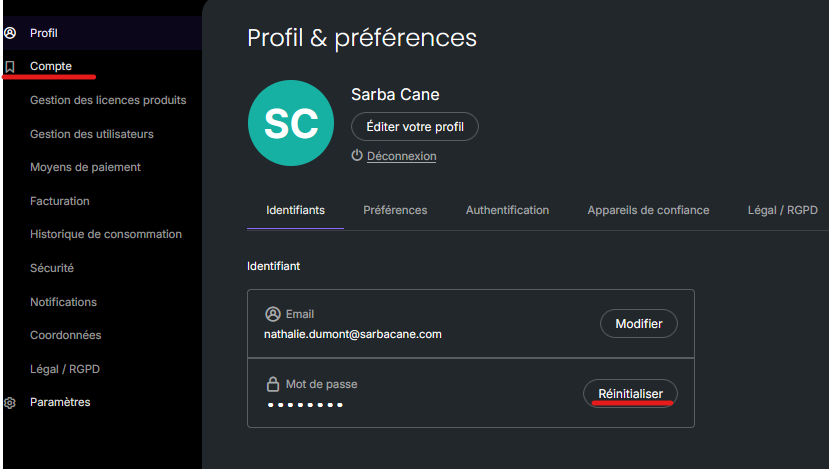
In the top-right corner of the screen, click your avatar: the Profile & preferences page opens on the Credentials tab.
In the Password block, click Reset.
Enter your current password.
Enter your new password twice: at least 12 characters, including one uppercase letter, one lowercase letter, one number and one special character.
Click the blue check mark to confirm.
Your new password is saved immediately. Use it the next time you log in.
Check that your new password:
is not too similar to the old one;
contains at least 12 characters, including one uppercase letter, one lowercase letter, one number and one special character;
does not contain any of these characters, which are not accepted: / (slash), _ (underscore), +.
Reset it from the login page: follow the article I forgot my password. What should I do?.
