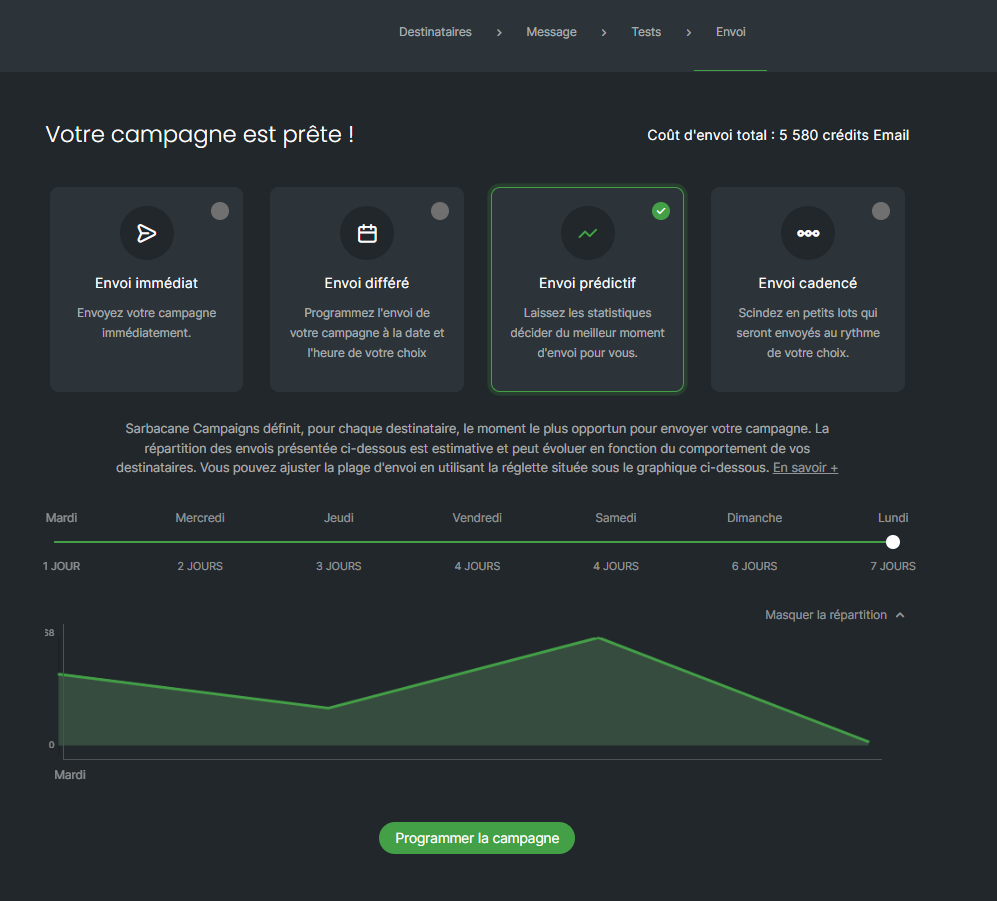
With predictive sending in Sarbacane Campaigns, your email campaign doesn't reach everyone at the same time: each recipient gets it when they most often open and click their emails. You simply choose how many days the sending can be spread over (from 1 to 7).
A Sarbacane Campaigns subscription with the Premium plan or higher.
An email campaign ready to send (recipients, message and checks completed).
At the top of the screen, click the Send step.
On the page telling you that your campaign is ready, click the predictive sending tile (the third one).
Below the explanation text, move the slider to choose the length of the sending window, from 1 to 7 days.
(Optional) On the right, below the slider, click the link that shows the distribution to see the estimated number of sends per day.
Caution: once the campaign is scheduled, predictive sending can't be stopped or changed.
At the bottom of the page, click the button that schedules the campaign.
The campaign is sent in small batches over the period you chose. Each contact receives it when they usually check their emails. If a recipient opens another email sent with Sarbacane before the planned time, their campaign is sent right away, while they are reading their messages.
Recipients whose habits Sarbacane doesn't know yet also receive the campaign: the time they open it is recorded for your next sends.
Note: if behavioral tracking is turned off, predictive sending uses the data already known about your contacts, but new opens are not recorded.
Note: spreading out the sending also helps deliverability. Mailbox providers receive your emails in several batches rather than all at once, which reduces the risk of ending up in spam.
Your list is entirely new: Sarbacane has no data on these contacts' reading habits. Choose another sending mode for this campaign (immediate, scheduled or staggered sending). Opens will be recorded and predictive sending can be used for your next campaigns.
Predictive sending is available with the Premium plan and higher. To change plans, contact your account manager.
This is normal during the sending window you chose: sending continues until the end of the period. Your campaign statistics fill in as it goes.
