If your email already exists in HTML, import it at the Message step of your campaign with the HTML file option. It then opens in the Sarbacane Campaigns WYSIWYG editor, where you edit it on screen or directly in the code.
A Sarbacane Campaigns license.
An email campaign already created (see How do I create an email campaign in Sarbacane Campaigns?).
Your email in HTML: a file, the address of an online page or the code to paste.
In the breadcrumb at the top of the screen, click the Message step.
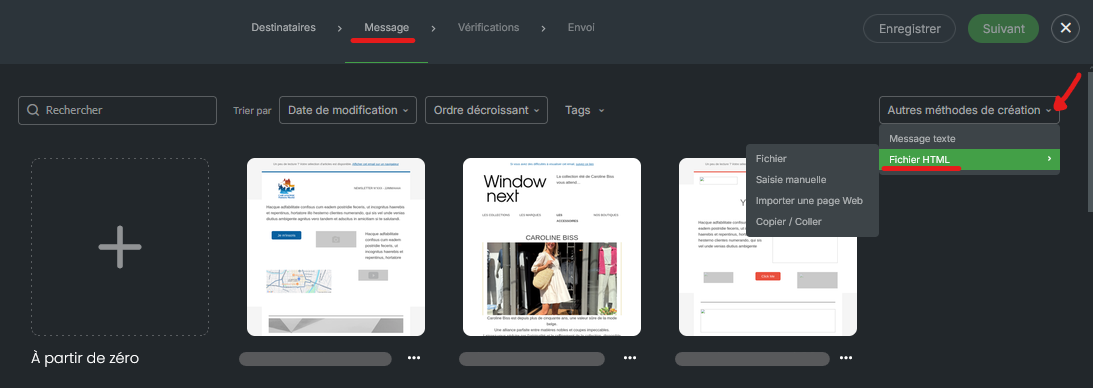
At the top right of the templates page, open the list of other creation methods, then hover over the HTML file option.
In the submenu that opens on the left, choose the source of your code:
file, to import a file from your computer;
manual entry, to write the code;
import a web page, to retrieve an online page from its address;
copy / paste, to paste code copied elsewhere.
Import or paste your code. The email appears in the WYSIWYG editor.
Edit the email on screen or in the source code.
Important Before saving, click the source code button to display the HTML code again and check that it contains your changes. Otherwise, the changes made on screen may not be saved.
At the top right of the screen, save your campaign, then go to the next step to reach the checks.
Your email appears in the WYSIWYG editor with your layout. The Advanced settings are available (tracking, unsubscription, attachment, image hosting…), except saving as a template (see What is in the advanced settings of an email campaign in Sarbacane Campaigns?).
Before saving, click the source code button to update the HTML code with the changes made on screen, then save again.
Campaigns created from an HTML file cannot be saved as templates. To reuse an email, create it with the EmailBuilder (see How do I use the EmailBuilder in Sarbacane Campaigns?).
The rendering depends on your code. Technical support helps you use Sarbacane Campaigns, but does not develop or fix HTML, CSS or JavaScript code.
