To send an email made only of text, without images or formatting, choose the text message option at the Message step of your campaign. This format suits short, direct messages (internal communication, information), but the open rate cannot be measured.
A Sarbacane Campaigns license.
An email campaign already created (see How do I create an email campaign in Sarbacane Campaigns?).
In the breadcrumb at the top of the screen, click the Message step.
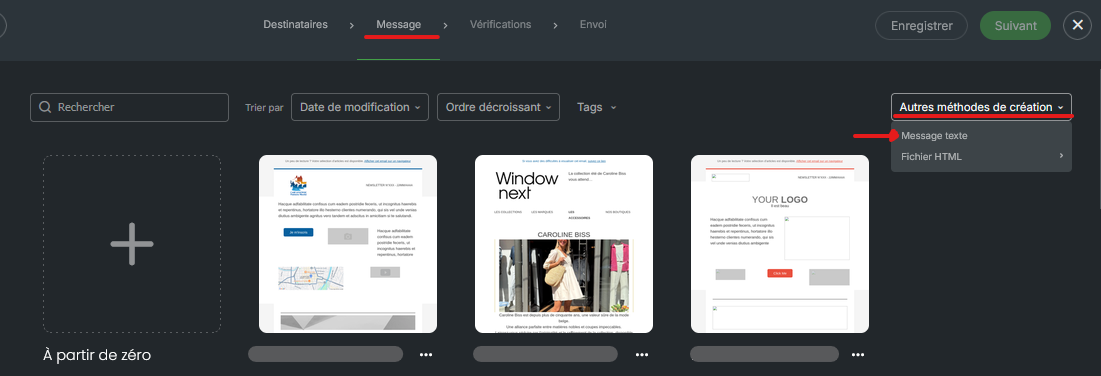
At the top right of the templates page, open the list of other creation methods, then click the text message option.
Write your message in the text editor.
If needed, insert personalization fields (first name, last name…), see the article on personalization fields.
In the upper part of the screen, fill in the header: sender, subject and preheader.
At the top right of the screen, save your campaign, then go to the next step to reach the checks.
Your message appears without images, buttons or layout. In the Advanced settings, you keep unsubscription, attachment, tags and sharing (see What is in the advanced settings of an email campaign in Sarbacane Campaigns?).
Note The tracking setting does not exist for this format. An open is measured with an invisible image, which a text-only message does not contain.
This is normal for a text-only message: opens cannot be measured. To track them, create your email with the EmailBuilder (see How do I use the EmailBuilder in Sarbacane Campaigns?).
The text message format only accepts text. To add images or buttons, use the EmailBuilder or the HTML file mode (see How do I create an email campaign from an HTML file in Sarbacane Campaigns?).
