In Sarbacane Campaigns, an email campaign created with the EmailBuilder automatically adapts to smartphones. If a block does not display well, check it in the mobile view and change its display rules in the block properties: you can show it on one type of device only, or change how its columns behave.
A Sarbacane Campaigns licence.
An email campaign created with the EmailBuilder, at the Message step. The mobile view does not exist for campaigns created from an HTML file or as text only.
Above the email, in the centre, click the switch between the phone icon and the screen icon to go to the mobile view.

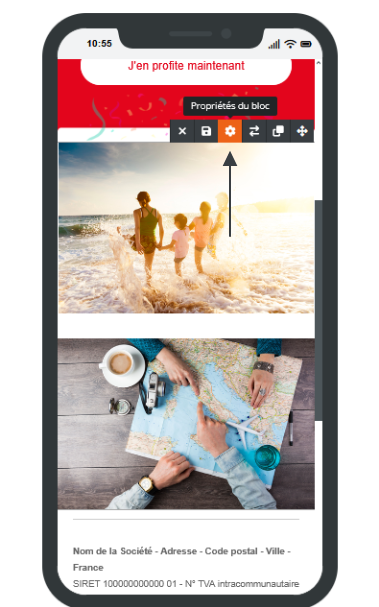
Click the block that does not display well.
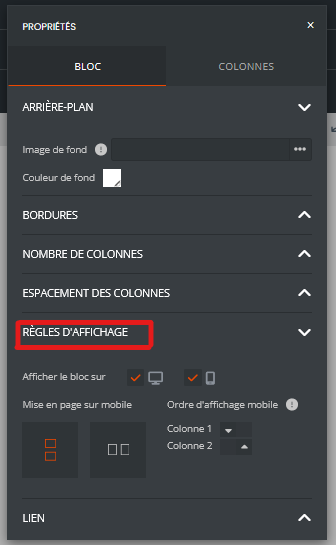
In the properties panel that opens on the right, block tab, expand the display rules section.
Choose the setting: show the block on desktop only, on mobile only or on both; change the display order of the columns on mobile (for example, the image below the text instead of on the left); keep the columns side by side or stack them.
Switch back to the desktop view with the same switch to check the result on both devices.
Note: the display rules are also available in the desktop view.
Best practice: before sending, at the checks step, send a test and open the email on your own phone. The editor preview does not replace a real email client.
In the mobile view, the block is displayed according to your setting.
Hide it on mobile, then add a simplified version of the same content, visible on mobile only. Avoid blocks with several crowded columns.
A copy keeps the display rules of the original campaign (column order, hidden blocks). If the content has changed, go to the mobile view and check each block again.
