A 0% open rate or click rate immediately after sending is almost always due to one of two causes: open tracking is disabled, or the campaign was sent as plain text. Both can be verified in a minute. This article covers these two causes first, then the less frequent ones.
Before you start: the corrections below apply to your next campaign. If a campaign has already been sent with tracking disabled or as plain text, its statistics cannot be recovered retroactively: there is no pixel or rewritten link to activate retroactively.
Sarbacane does not directly know that an email has been opened: it deduces it through two distinct mechanisms.
The open rate is based on a tracking pixel: an invisible 1x1 pixel image, automatically inserted into the HTML code of the email. When the recipient opens the message and the images load, this image is called from Sarbacane's servers, which counts as an open.
The click rate is based on rewritten links: each link in the email is replaced by a Sarbacane redirect URL, which records the click before redirecting the visitor to the actual destination page.
If one of the two mechanisms cannot be triggered, the corresponding statistic remains at zero, even if your emails have been delivered and read.
It is also possible to verify whether the emails have been delivered properly from the sent campaigns interface.
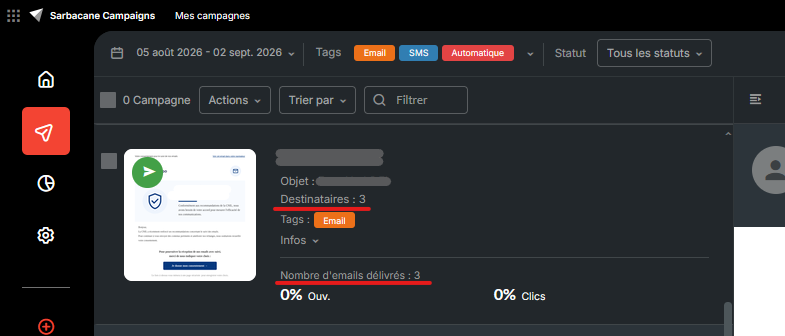
I. Is open tracking enabled for the campaign?
In the campaign settings, before sending, verify that open tracking is enabled.
Open the campaign
Go to the message section of it
Click on "advanced configuration" under the following button in the top right of the screen.
The first "Tracking" option must be marked as "active".
If it is marked as "inactive", you will need to select it to activate tracking
Note: To know after sending whether a campaign has its tracking pixel activated, you will need to duplicate it and check in the same place whether the pixel is active or inactive.
II. Was the campaign sent as plain text?
A plain text email contains no HTML code, so there is nowhere to insert the pixel: it simply does not exist in this format. Click tracking can continue to work in plain text, provided that the links were properly rewritten by Sarbacane at the time of sending; if clicks are also at zero, verify that the campaign was not composed or pasted in a way that prevented Sarbacane from detecting the links.
Note: To verify which campaign format was used after sending your campaign, you will need to duplicate the previously sent campaign. Once in the message section, if you do not see the usual email builder block present in Sarbacane campaigns, it means you created a plain text campaign.
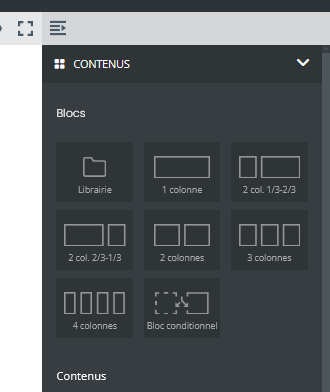
You will then need to restart the campaign and select the "start from scratch" option in the template choice.
Other reasons that can skew the figures
Even with tracking enabled and HTML sending, several elements specifically skew the open rate:
Outlook, in particular, often blocks the loading of external images by default, until the recipient clicks on "Show images". Without image loading, the pixel never triggers.
Apple's Mail Privacy Protection does the opposite: it systematically preloads all images, including the pixel, upon message receipt, whether it is read or not. On a list composed mainly of Apple Mail/iOS users, this can inflate the open rate rather than bring it to zero. In both cases, it is a reminder that the open rate alone is no longer completely reliable.
Best practice: prioritize the click-through rate as your main performance indicator rather than the open rate, since both image blocking and Apple's preloading distort opens in opposite directions.
An ad blocker, antivirus software, or secure business email can also block third-party images identified as trackers.
The campaign was sent today and statistics are still at zero. Depending on the size of the list and sending reputation, full delivery can take time, and statistics only arrive as actual opens occur. A slight delay in interface refresh is also normal.
I sent a test to a restricted or internal list. If no one on this list has opened the message yet, statistics will remain at zero, regardless of settings.
This is an SMS campaign, not an email.
SMS statistics do not have a concept of "opens": this is not technically measurable on this channel. Only deliverability statistics, and click statistics where applicable, apply.
