In Sarbacane, a behavioral tracking opt-out link is automatically inserted in the footer of your emails created with EmailBuilder. It allows your recipients to refuse the measurement of their opens and clicks while remaining subscribed to your emails, in compliance with CNIL requirements.
Have access to the “Studio” and “Campaigns” modules in Sarbacane.
Sarbacane automatically adds a dedicated sentence to the footer of your emails, placed just before the standard unsubscribe sentence:
“You can refuse behavioral tracking of our emails at any time by following this link. If you no longer wish to receive our communications, follow this link.”
The first link leads to a secure system form. From this form, your recipient can refuse behavioral tracking (measurement of opens and clicks) without unsubscribing from your mailing list. The links in your emails keep working normally; they are simply no longer measured. The second link remains the standard unsubscribe link.

Note: this insertion is fully automatic when you create a new campaign (Start from scratch) or load a newly created template. No technical configuration is required on your part.
Important: this link generation is not retroactive, either on existing templates or on duplicated campaigns.
To add the link to an existing campaign (or replace the old “refuse tracking pixels” sentence):
1. Go to the footer of your campaign.
2. Add a line just before the existing unsubscribe sentence.
3. Type the text of your choice, for example: “You can refuse behavioral tracking of our emails at any time by following this link.”
4. Select “following this link” and click the link settings icon (the chain link).
5. In the window that opens, select the type “To the behavioral tracking unsubscribe form”.
6. Confirm your choice.


Note: the “To behavioral tracking preferences management” option redirects to the URL you defined in the Campaigns settings or directly in the campaign settings:
Campaigns > Settings > Campaigns > Behavioral tracking preferences
If you have customized the footer of your designs or the formatting of system links, check how these lines look before sending your campaign:
Open your template in a campaign.
Send a test email.
Check that both sentences fit properly into your layout.
Best practice: always send a test email to check the readability and alignment of the footer on desktop and mobile.
The behavioral tracking opt-out sentence is clearly displayed just above the unsubscribe sentence, with an active hyperlink.
When you move to the Verification step of your campaign, Sarbacane checks that both the unsubscribe link and the behavioral tracking consent withdrawal link are present. If one is missing, a window warns you, just as it already did for the unsubscribe link.
Depending on the case, the alert is titled:
Unsubscribe link: the unsubscribe link is missing.
Behavioral tracking consent withdrawal link: the behavioral tracking opt-out link is missing.
Behavioral tracking consent withdrawal and unsubscribe link: both links are missing.
To fix this, close the window with the cross, go back to editing your message and add the missing link (see the section “Add the behavioral tracking opt-out link to an existing campaign” above). If your message is sent as multi-part (HTML and Text), define the link in both versions.
If you do not want to include this link, tick Do not include behavioral tracking consent withdrawal (and, if needed, Do not include an unsubscribe link). The Validate button stays greyed out until the box is ticked.
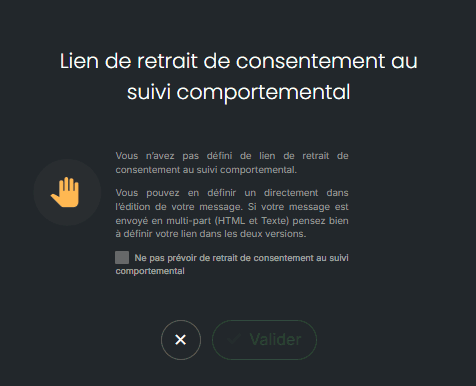
Important: without this link, your recipients can no longer refuse behavioral tracking from your emails. As the data controller for their data, you must offer them another simple way to do so.
The behavioral tracking opt-out link distorts your footer.
If the sentence overlaps another visual element, adjust the margins of the footer block or reset the style of system links in your template settings.


