In Sarbacane, the native column tracking pixel consent cannot be directly associated with a form question. To record your recipients' tracking pixel consent via a form, you must use a temporary intermediate column, then export and reimport your contact list.
Have a contact list and a form license in Sarbacane.
In your Sarbacane contact list, create an empty custom column (for example named Tracking consent).
In your form editor, associate the consent question (checkbox) with this intermediate tracking consent column.
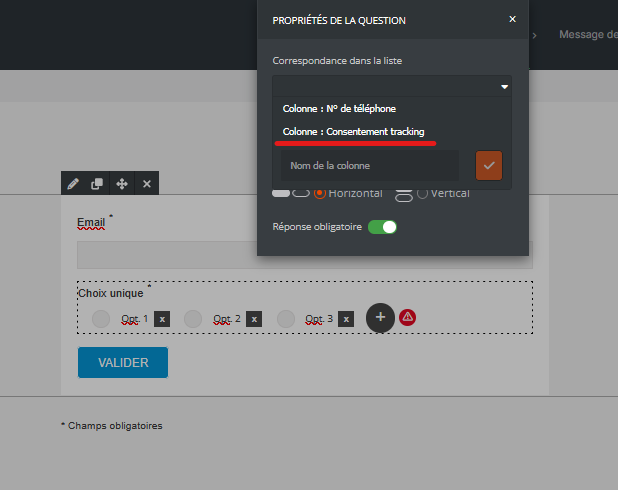
Distribute your form and collect responses from your recipients.
Export the contact list containing the responses collected from the form.
Re-import the exported file into Sarbacane.
At the column mapping step, associate the intermediate column Tracking consent from your file with the native column consent to tracking pixel.
Important: updating tracking pixel consents collected by form is not automatic or real-time. You must manually repeat the export and re-import procedure after each new collection wave only if you are using a Sarbacane form.
The tracking pixel consent ("yes" or "no") is correctly recorded in the native column consent to tracking pixel on the profile of each relevant contact.
Pixel consent does not automatically appear on the contact record after form submission This is the current behavior of the application. Since the native consent column cannot be directly linked to form fields, the file export and reimport procedure is essential to transfer data from the intermediate column to the native column.
→ How to manage tracking consent in the Sarbacane contact directory?
→ How to import tracking pixel consent in Sarbacane?
→ How to collect tracking pixel consent via a campaign in Sarbacane?
