In Sarbacane Campaigns, you can cap the number of campaigns the same address receives per week or per month. Beyond that, the contact is excluded from the campaign. Too many sendings increase unsubscribes and complaints, which harms your deliverability.
A Sarbacane Campaigns licence. Every user can change this setting.
In the left menu of Sarbacane Campaigns, click Settings.
In the settings menu, click Campaigns.
Open the Email tab (or the SMS tab for your SMS campaigns).
Turn on the switch Control marketing pressure by limiting the number of sendings to a recipient's email address.
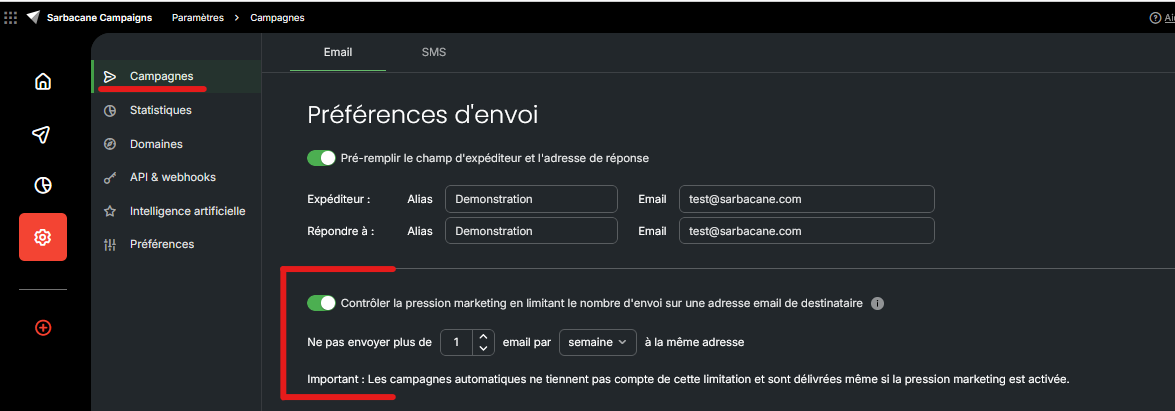
On the line Don't send more than [n] email per [Week/Month] to the same email address, enter the number, then choose the period.
In the SMS tab, the switch and the line are the same, applied to the recipient's phone number.
Note: the email limit and the SMS limit are counted separately. They do not apply to automated campaigns (follow-ups included), or to sendings from Sarbacane Sendkit and Sarbacane Engage.
A confirmation message shows that the campaign settings have been saved. In your next sendings, contacts who have reached the limit appear in the Excluded tab of the Recipients step, with the cause Marketing pressure.
Open the Excluded tab of the Recipients step: contacts with the cause Marketing pressure have already received the maximum number of emails for the period.
Automated campaigns and sendings from Sarbacane Sendkit and Sarbacane Engage are not counted.
