The Usage history table lists the email and SMS credits used by each of your Sarbacane campaigns. Only the account owner and administrators can access it. You can filter and export it.
Be the account owner or an administrator.
At the top right of the screen, click your initials (or your avatar).
In the left-hand menu, click Home.
In the left-hand menu, click Usage history.
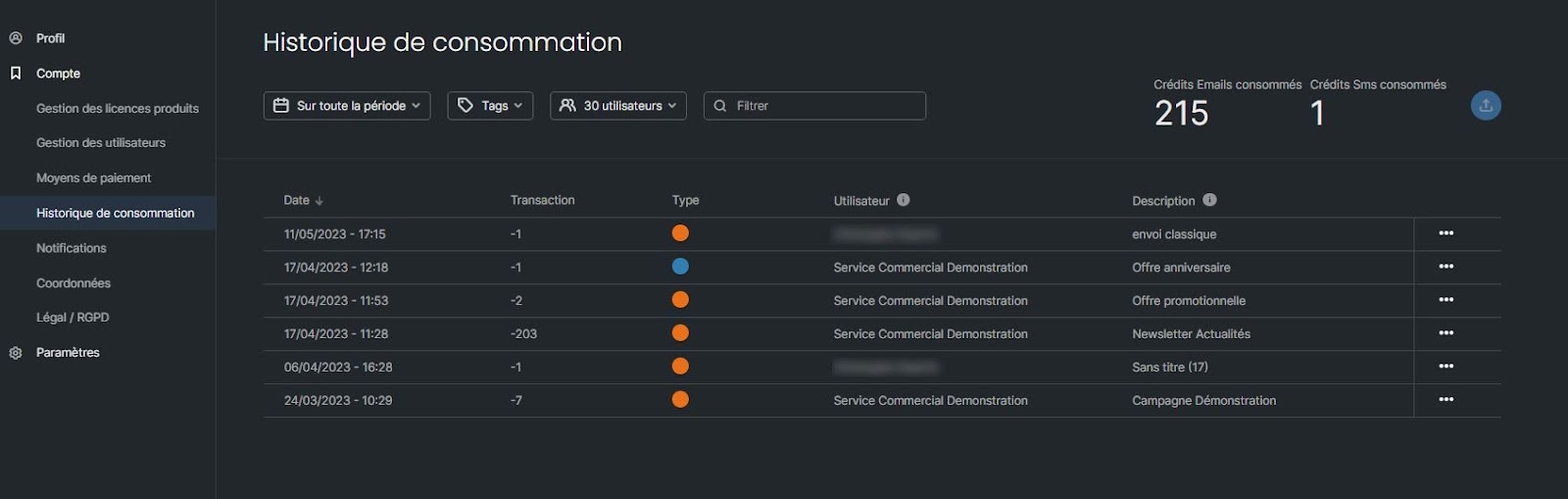
At the top of the page, filter the table by period, by campaign type (email, SMS, automated campaigns or tests), by user or by user group. You can also search for a campaign by name.
Click the export button to download your usage history as a file.
For each campaign, the table shows:
the date;
the number of credits used;
the type (email or SMS);
the user who sent it;
the campaign name.
At the top right of the table, you can see the total number of emails and SMS used for your filters.
Only the account owner and administrators have access to it. Ask them to check the history for you, or to make you an administrator.
First check the period and user filters: the campaign may be outside the selected date range, or sent by another user. Then search for it by name.
