This section of the help center is dedicated to viewing the consumption history of your Sarbacane account. This feature will allow you to easily track your email and SMS credits used in your marketing campaigns.
To view your modification history, follow the steps listed below.
Log in to your Sarbacane account using your email address and current password.
Once logged in, click on your avatar at the top right of the screen to access your account and profile settings.
You are automatically redirected to the “Profile” section of the settings. Click on the “Account” section.
In the left-hand side menu, you will see different subsections related to your account. Look for the heading “Consumption history” and click on it.
This section allows you to view your email and/or SMS credit usage history in table form, with:
The date of each campaign that resulted in credit usage
The number of credits used
The type of campaigns (email or SMS)
The name of the user who sent the campaign
The name of the campaign
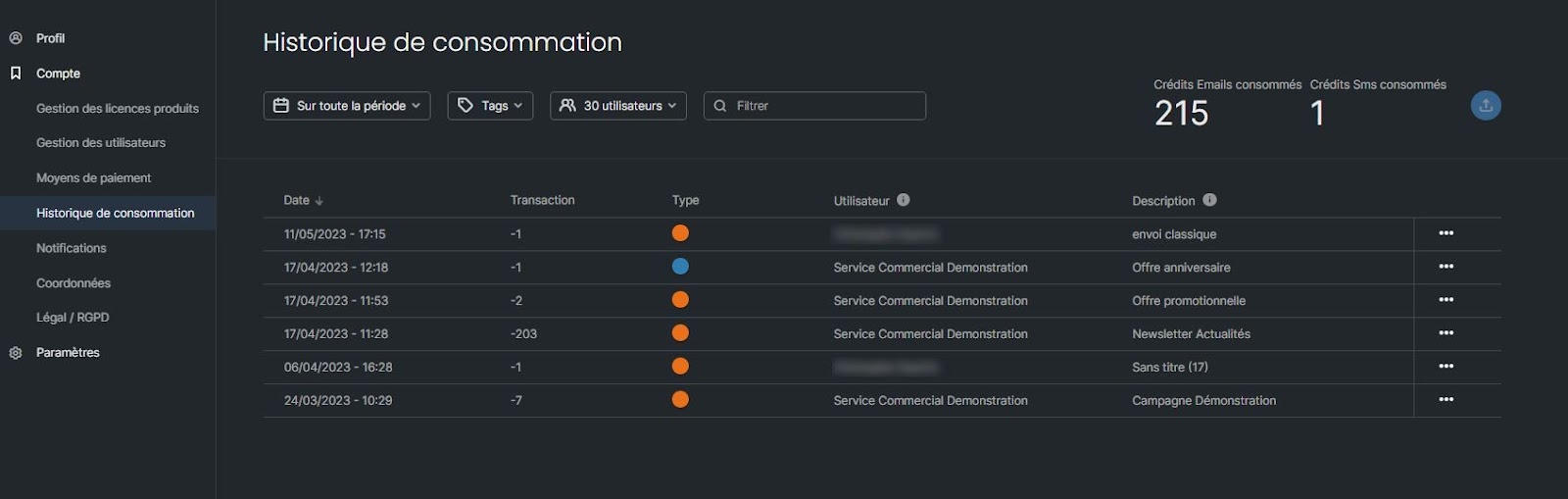
To facilitate the analysis of your sendings, you can filter the consumption history:
By period
By type of campaigns (Email, SMS, automated or test campaigns) using tag-based filtering
By user or user groups
By campaign name by entering a keyword in the search bar
At the top right, you will see the number of emails and SMS messages consumed according to the defined criteria.
Please remember that you also have the option to export your consumption history for more in-depth analysis.
