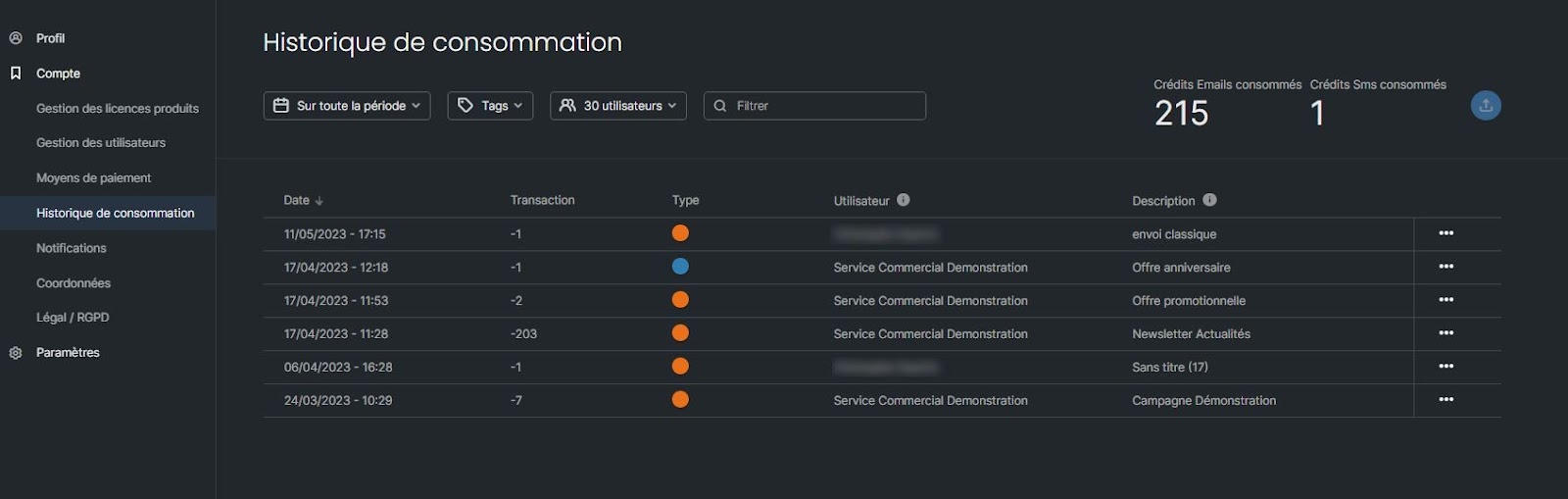
In Sarbacane, you can view your account's consumption history in the Account > Consumption history section. This table summarizes the email and SMS credits used by your campaigns and lets you filter or export them.
Be logged in to your Sarbacane account.
At the top right of the screen, click your avatar.
In the settings menu, click the Account section.
In the left-hand sidebar, click Consumption history.
The history table is displayed, showing the list of your usage with the following details:
The date of each campaign
The number of credits used
The campaign type (email or SMS)
The name of the sending user
The campaign name
The total number of emails and SMS messages used according to your criteria is displayed at the top right of the table.
You can refine the table display using the filtering options at the top of the page:
Period: filter by date range.
Tags / Campaign type: filter by email, SMS, automated campaigns, or tests.
User or group: filter by a specific user or user group.
Search: enter a keyword in the search bar to find a campaign by name.
Click the export button at the top of the page to download your usage history as a file.
→ What is a sending credit in Sarbacane?
→ How can you check your credit balance in Sarbacane?