In Sarbacane, you can check your available sending credit balance from the Consumption section of your account settings. This display allows you to track your email and SMS consumption and anticipate your replenishment needs.
Be logged into your Sarbacane account.
Be the owner or administrator of the account.
In the top right corner of the screen, click on your initials (or your avatar).
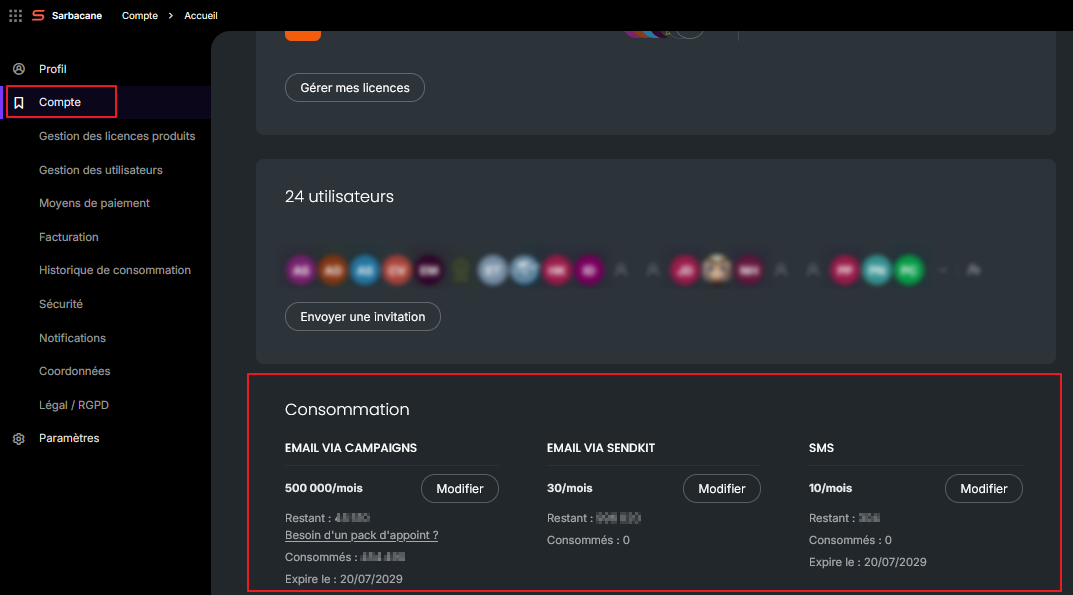
In the left sidebar menu, click on the Account tab.
Scroll down the page to the Consumption section (bottom of page)
At the bottom of the Account page, the Consumption block displays your available email and SMS credit balance in real time.
Consumable inaccessible? Only account administrators and owners can access this information. You will need to contact them to obtain your balance.