The owner or an administrator invites a new user from User Management, choosing their group, role, and licenses. The invitee receives an email, accepts the invitation, and creates their password: they can then access the shared account without creating a separate Sarbacane account.
Be the owner or an administrator of the account.
Have an available license for each application the new user needs access to (Sarbacane Campaigns, Sarbacane Forms, Sarbacane Pages, etc.). If not, purchase one first: How do I purchase a license?
At the top right of the screen, click your initials (or your avatar).
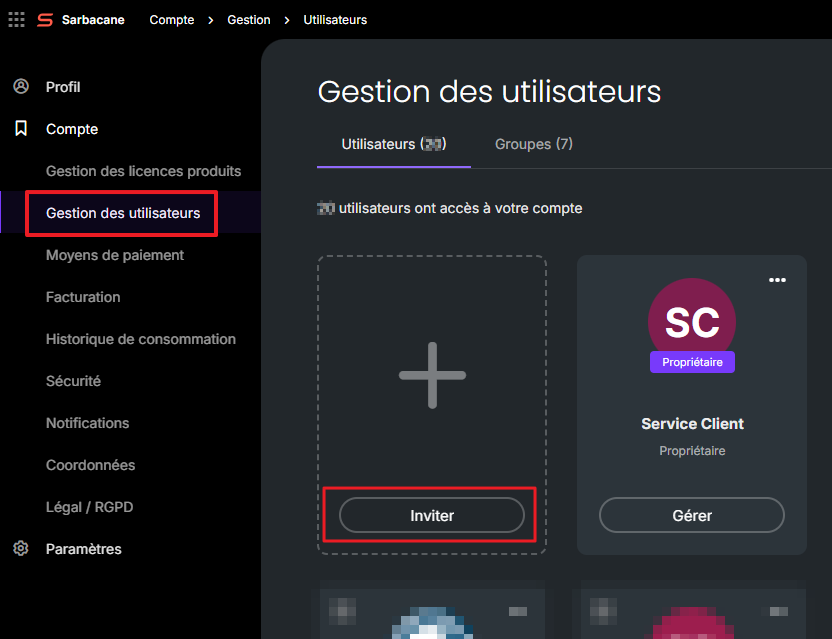
In the left-hand menu, under Account, click User Management.
Open the Users tab, then click Invite.
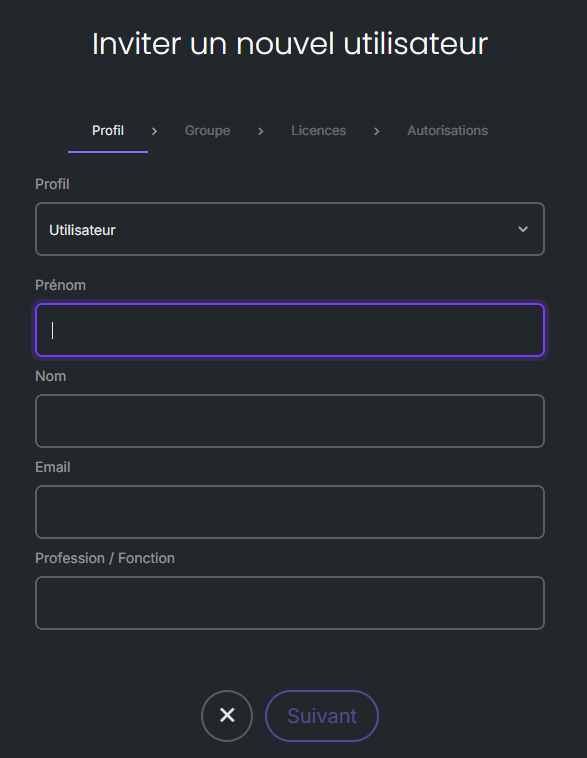
In the Group tab, select the user's group.
In the Profile tab, enter their first name, last name, and email address, then select their role (Administrator or User).
In the Licenses tab, check the licenses to assign to them.
Click Send invitation.
Note : if you do not select any licenses in step 6, the user will be able to sign in to the account but will not have access to any applications.
Open the invitation email.
Click Accept invitation.
When you sign in for the first time, create your password.
Administrator side: a user profile appears with the status Pending, until the invitee accepts the invitation.
Invitee side: you can access the shared account using your email address and password, and see the resources shared with you.
If you have access to multiple accounts, select the shared account:
When logging in : after entering your credentials, click the arrow next to the account name, choose the desired account from the list, then click Confirm.
During a session : in the top-right corner of the screen, click your initials (or your avatar), click the account name, then select the desired account from the list.
The invitee has not yet accepted the invitation. The owner or an administrator can go to User management to resend the invitation as a reminder, or delete it to revoke access.
Ask them to check their junk mail (spam) folder and other email folders. If they still cannot find it, resend the invitation from User management.
