The owner or an administrator can set an email and SMS credit allowance (routing credits) for a user group, per month or per year. All group members share this allowance. Once it is used up, none of them can send a campaign until the end of the period.
Important: the limit applies to a group, never to an individual user. The owner and administrators cannot be limited.
Be the account owner or an administrator.
Have created the group to be limited: see How to create and manage user groups?
At the top right of the screen, click your initials (or avatar).
In the left menu, click User Management, then open the Groups tab.
On the group card, click Manage.
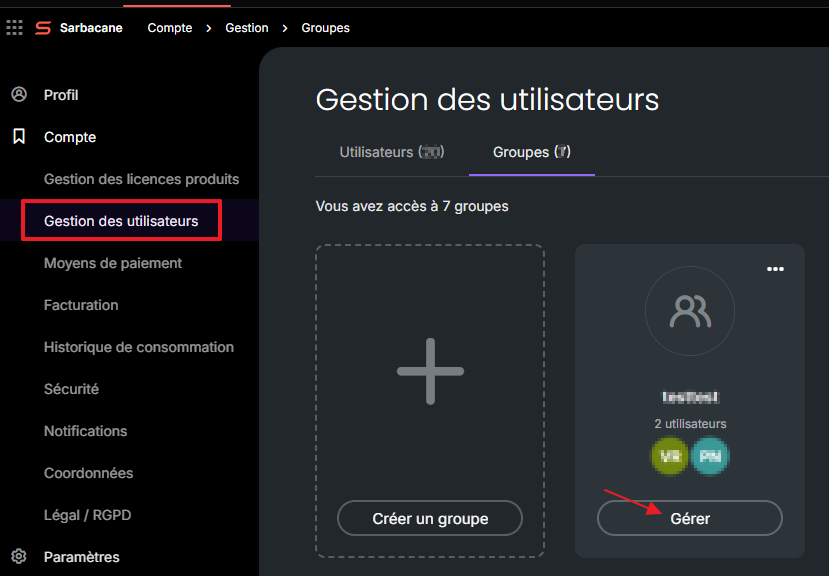
Open the Consumption tab.
Turn on the Limit email sending toggle, the Limit SMS sending toggle, or both.
In the sentence “Group users share an allowance of … email credits per …,” enter the number of credits, then choose Month or Year.
At the bottom of the page, click Apply my choice.
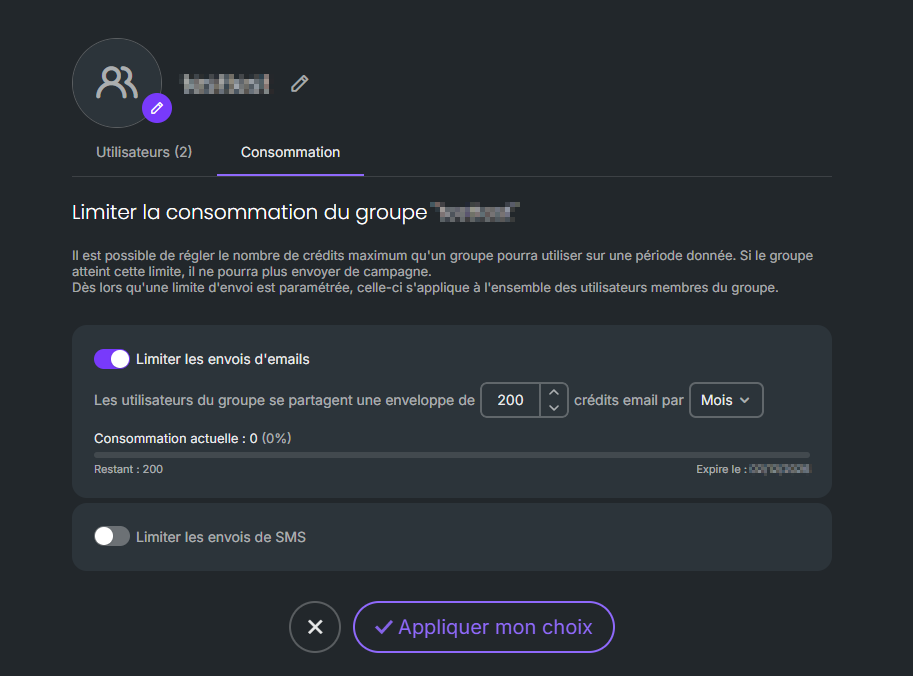
Below each enabled limit are displayed the Current usage, Remaining credits, and the period end date (Expires on…).
Check in this order:
In the group's Usage tab, check whether the allowance has been used up. If so, increase it or disable the limit.
If the allowance has not been used up and the other group members are sending normally, check the user's permissions: in their profile, under the Permissions tab, in the Campaigns section, under Campaign sending, the Send email campaigns and Send SMS campaigns toggles must be enabled.
The limit does not apply to an individual user. Instead, disable their sending rights in the Permissions tab of their profile, Campaigns section: see What are the user roles and permissions in Sarbacane?
In the group's Consumption tab, turn off the relevant toggle, then click Apply my choice.
